Got an Apple Watch and track your workouts?

This app is designed to use your Apple Fitness workout sessions as a data source which are created by Apple Watch workouts, the iOS Apple Fitness app and 3rd party apps. This app does not create workout sessions, but rather uses them as the data source.

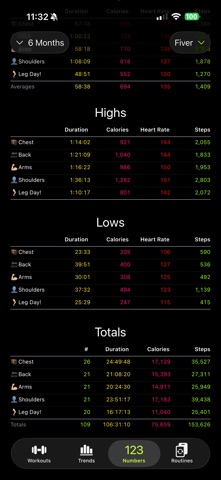
View and track progress of your workout routines, keep notes and which muscles were targeted, as well as view trends over time to see your improvements.

---

NOTABLE RECENT UPDATES:

- An Apple Watch companion app to view (1) your next workout, (2) current month averages and (3) current month totals.
- Trends view with charts of workouts, durations, calories burned, heart rate, distance, pace, etc.
- Ability to specify muscle groups and/or specific muscles focused on during workout sessions.

---

Do you have a workout routine you like to follow and track?

- Add your workout routines with activities and targeted muscles.
- After an Apple Fitness workout session, assign your workout routine activity to the workout session.
- View trends of your routines over time to beat your personal bests.

Do you like to balance your workout types (e.g. strength training vs aerobic)?

- Assign workout categories to workout sessions.
- Specify what muscle groups and/or muscles were focused on during a workout session.
- Workout categories can be automatically assigned to workout sessions based on the workout activity type (built-in Apple Fitness activity types) or by the workout routine activity (in this app).

Do you like to add notes to your workout sessions?

- Add notes to workout sessions.
- Add an emoji reaction to workout sessions.
- Add tags to workout sessions (which will later be used for filtering and trends).
- Add data-points to your workout sessions (which will later be used for filtering and trends).

Do you like to see your workout progress over time?

- View trends over time of your workouts, activities, categories, muscle groups and routines.

---

PLANNED FEATURES:

- Add photos to workout sessions.
- Use of your own images for routines and activities. For now, either an emoji or SF Symbol (by name) is supported. (For more information about SF Symbols, see https://developer.apple.com/sf-symbols/. Relevant symbols have with a "figure" prefix.)

---

DEFINITIONS:

- Workout Session
A built-in Apple Fitness/HealthKit record in the iOS ecosystem created by various apps. For example an Apple Watch workout, the iOS Apple Fitness app and 3rd party workout apps. This app reads these records and provides ability to link data to them and view trends over time. This app does not create workout sessions, but rather uses them as the data source.

- Workout Routine
A workout routine is a plan that consists of a series of workout activities.

- Workout Activity
A workout activity is an individual workout, usually performed on its own day (e.g. "leg day"), focused on a specific muscle group (e.g. arms, back, chest, legs, shoulders) or general activity (e.g. full-body, running, walking). It is a one-to-one match of a single workout session. They are performed sequentially and then repeated within a workout routine.

- Workout Category
There is a collective understanding amongst health institutions that there are four primary types of exercises: endurance, strength, balance and flexibility.

This app builds on this concept while adding three additional types: core, mindfulness and sports. As well as renaming endurance to aerobic and flexibility to stretching.

In conclusion, when using categories within this app (i.e. filtering, workout activity assignment, etc.), there are seven available: aerobic, balance, core, mindfulness, sports, strength and stretching.