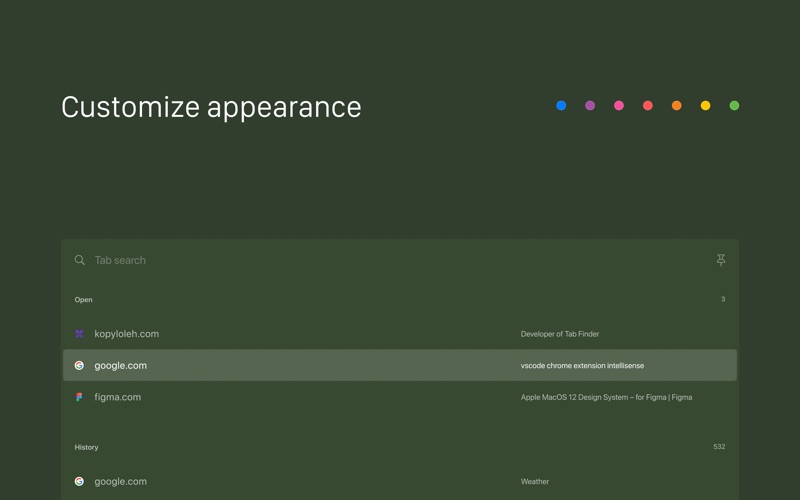
Search, navigate, and organize your browsing history faster than ever. This lightweight Safari extension enhances productivity with quick tab switching and search. Navigate in the history of open tabs with Option+Tab in the same way you navigate between your apps.

The app is fully functional. The only difference is that it shows up to 5 tabs.

Features:
- Gorgeous tabs list panel with website icons;
- Switching tab history navigation with Option+Tab (or set your own shortcut);
- Tab search;
- Tab closing;
- Open new tab from history;
- Customizable shortcut;
- Ability to set a color tint in;
- Ability to sort tabs other than by last seen;
- Ability to configure columns order;
- Ability to keep the tabs list panel open when you release your shortcut keys;
- Dark mode, light mode;
- Does not ask for permission to read "webpage content". Permission to access "browsing history" is only used to display tab titles;
- 100% native macOS app. Not a single line of JS code;
- Works even when tabs are loading and on empty and history pages;
- Does not dim Safari when tabs list panel is open;
- Almost native experience;
- Open source. Which means 100% transparency;
- In active development.

Code: https://github.com/kopyl/safari-tab-switcher

Getting Started:
Watch this video on how to set it up: https://youtu.be/BxfLPtfK3zQ
or follow these steps:

1. Open the app
2. Open Safari Extensions, enable Tab Finder Lite extension and press the "Always allow on every website" button

Keep in mind:
- The extension does not work with profiles yet;
- The extension looses tab switching history when switching between tab groups;
- After restarting your Mac, please open the app again to start using it;
- Extension can only search for tabs in a last focused window. It does not search across multiple windows. Each window has its own tab navigation history. This can change in the future.
- The Tab Finder Lite icon has to always stay in the Safari Toolbar for the extension to work

If something doesn't work as expected, feel free to reach out: [email protected] , I will happily help you :)

This plugin has slightly similar feature to chrome tab switcher which chrome users usually invoke with Command+Shift+A.