Stop typing text manually.

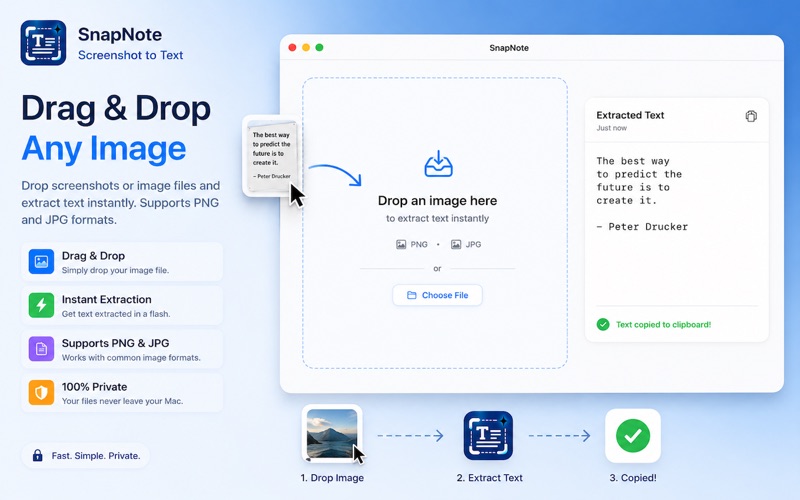
SnapNote OCR lets you instantly extract and copy text from screenshots, images, PDFs, videos, presentations, and any part of your screen — fully offline and privacy-friendly.

Whether you're copying text from a Zoom call, extracting notes from a PDF, saving content from images, or grabbing subtitles from videos, SnapNote makes text capture effortless.

Simply press your shortcut or use the menu bar to select any area of your screen. SnapNote instantly extracts the text and copies it to your clipboard — fast, accurate, and without internet.

Perfect For:
• Copying text from screenshots
• Extracting text from PDFs
• Capturing subtitles from videos
• Saving notes from presentations
• Copying locked or unselectable text
• Quick OCR during meetings, work, or research

Features:
• Instant screenshot-to-text OCR
• Works fully offline for complete privacy
• Menu bar access for quick capture
• Automatic clipboard copy
• OCR history to revisit past captures
• Export extracted text as PDF
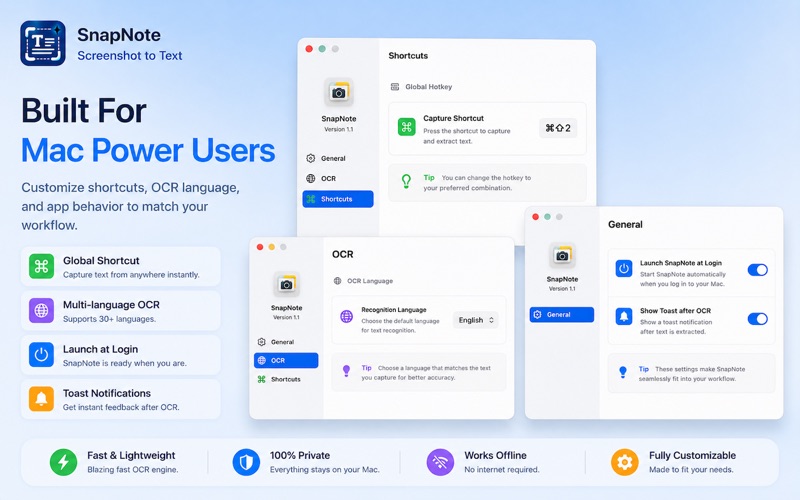
• Launch at login support
• Customizable settings and shortcut key
• Multi-language OCR support

Supported Languages:
English, French, German, Spanish, Italian, Portuguese (Brazil), Chinese (Simplified), Chinese (Traditional), Cantonese (Simplified), Cantonese (Traditional), Korean, Japanese, Russian, Ukrainian, Thai, Vietnamese, Arabic (Saudi), Arabic (Najdi), Turkish, Indonesian, Czech, Danish, Dutch, Norwegian, Norwegian (Nynorsk), Norwegian (Bokmål), Malay, Polish, Romanian, and Swedish.

Fast. Private. Built for macOS..