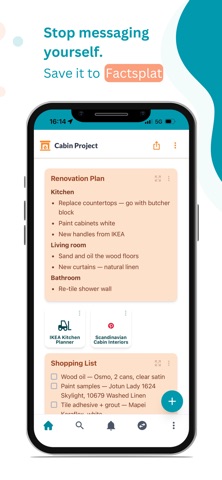
We all do it. You find a link, a document, a recipe, an interesting post. So you message it to yourself. Then it disappears into an infinite scroll.

Factsplat is where it all goes instead.


NEW: AI ASSISTANT

Ask the AI to create notes, organize your content, add colors, or set up a whole project for you. It works right on your board you see changes as they happen, and you can undo anything.


SAVE FROM ANY APP

Tap share, pick Factsplat, done. Links, notes, files, photos. Saved in one tap from whatever app you're in. No copy-pasting, no emailing yourself.


CAPTURE ON YOUR PHONE, ORGANIZE ON ANY DEVICE

Save things on the go. Organize them later on the web from any device. Your stuff follows you.


VISUAL BOARDS

Organize your stuff on boards called splats. See the big picture at a glance. Use colors and icons to make things scannable. Group related items into collections.


SHARE AND COLLABORATE

Share a board with friends, co-workers, or clients. Edit together in real time. Control who can view and who can edit.


FIND ANYTHING FAST

Full-text search across everything you've saved. Notes, links, files. Just type and find it.


WHAT YOU CAN SAVE

Links, notes with rich text, files, images, polls, discussions, calendars, and more. Everything lives on your boards, organized however makes sense to you.


PRICING

Free to download and use. Premium features (file uploads, custom colors, modes, AI assistant, and more) are available as in-app purchases.


For anyone drowning in tabs, bookmarks, and "I'll remember this later."

Terms of use (EULA): https://www.apple.com/legal/internet-services/itunes/dev/stdeula/
Terms of Service: https://factsplat.com/legal/terms
Privacy Policy: https://factsplat.com/legal/privacy