ClearSpace — Organize Your Photos Smarter
ClearSpace makes it effortless to clean up your camera roll and enjoy your photos without clutter
ClearSpace — Organize Your Photos Smarter

ClearSpace makes it effortless to clean up your camera roll and enjoy your photos without clutter. Swipe through your library, delete instantly, and organize with speed. Now with full video support, smarter long-press actions, and smoother performance.


Core Gestures
Swipe left → send to Trash
Swipe up / down → scroll through your photos and videos

Snap Mode (Settings) → lock each photo or video in place as you swipe for a focused, distraction-free review

Albums & Favorites
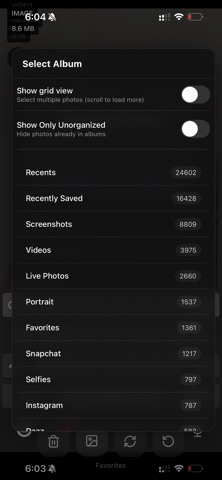
Switch between albums at any time

Tap the heart to mark or unmark Favorites (syncs with your iPhone’s Photos app)
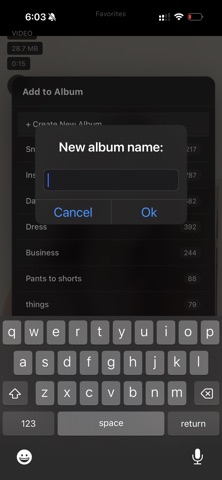
Long-press the Bookmark icon → create a brand-new album or quickly choose an existing one to move the current photo/video


Trash Handling

Deleted items move to ClearSpace’s built-in Trash
Empty Trash in one tap (upgrade/ad prompt applies if limits are reached)

Restore photos or videos back to their album whenever needed


Video Support (New!)
Tap any video → opens in full screen with sound
Smooth playback, scrubbing, and exit back to your place in the library


Long-Press Actions (New!)
On Photos: Hold to preview a larger version without leaving the scroll
On Videos: Hold to play a preview with sound, release to return instantly

In Grid View: Hold an image to enlarge it, or a video thumbnail to play inline

On Bookmark Icon: Hold to instantly create a new album or assign to one that already exists


Performance & Design
First photos appear instantly, large libraries load progressively
Smooth scrolling even with thousands of items
Minimal, gesture-driven interface keeps focus on your memories


Why ClearSpace?

Your photo library should be fast, simple, and fun to manage. ClearSpace gives you the cleanest way to scroll, delete, favorite, move, and preview with just a gesture. With video support, powerful long-press tools, and snap mode, it’s the most intuitive way to keep your camera roll clear.