Diff Pro Max is a professional-grade file comparison tool designed to be easy for anyone to use — no technical expertise required
Diff Pro Max is a professional-grade file comparison tool designed to be easy for anyone to use — no technical expertise required.

"What changed?" — answered in seconds.

Manually comparing files line by line is slow and error-prone. Diff Pro Max detects and highlights every change automatically. Just drag and drop two files.

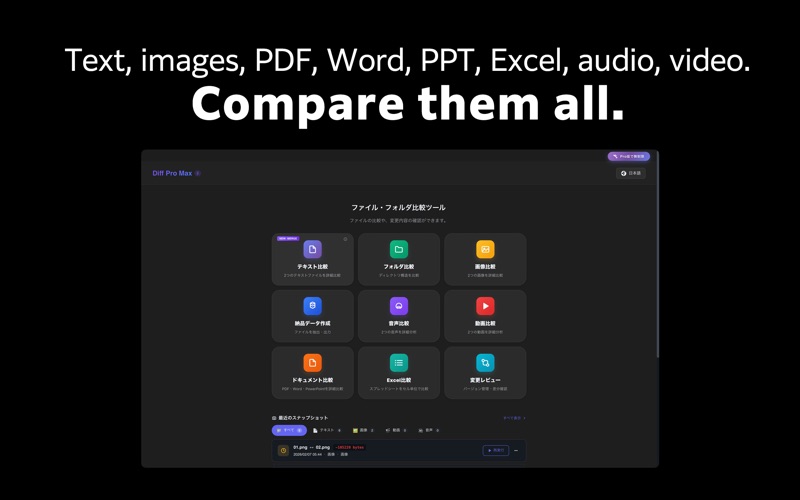
Text, images, audio, video, PDF, Excel — whatever the format, differences are instantly visible.

Sound familiar?
• You edited the code, but can't remember exactly what changed
• The designer says "I updated it" but you can't spot the difference
• You need to verify which version of a document was sent to the client
• You're about to deliver, but want to double-check everything

Diff Pro Max lets you compare, review, and merge — all in one place.

【Key Features】

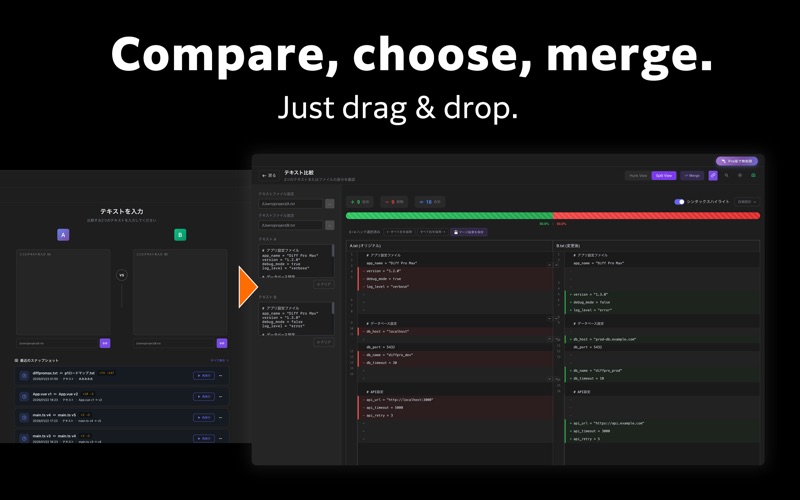
■ Text Compare
- Syntax highlighting for 150+ languages
- Hunk View and Split View modes
- Inline diff for character-level changes
- Regex search and quick navigation
- Merge mode: select left or right per hunk and save the result [New]

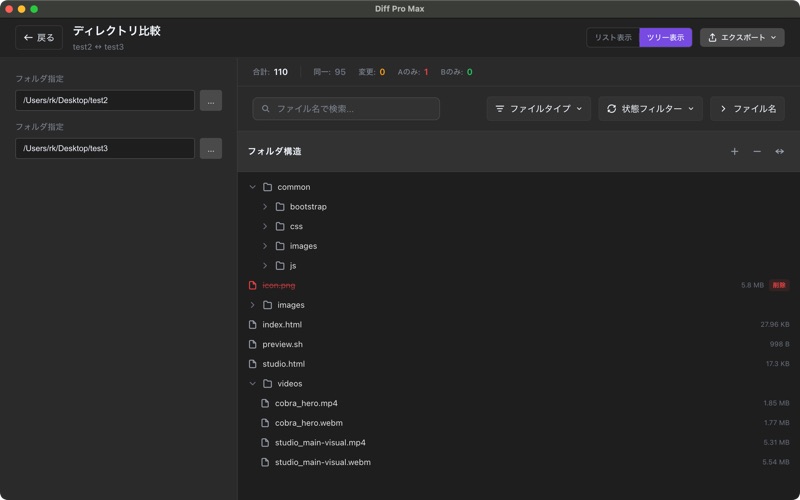
■ Folder Compare
- Hierarchical directory tree view
- Color-coded file status (added, changed, deleted)
- Exclusion patterns to skip unwanted files
- Date range filtering for specific periods
- Fast performance with 1000+ files

■ Image Compare
- Side-by-side visual comparison
- Overlay mode for detailed diff
- Synced zoom and pan controls

■ Audio Compare
- Waveform visualization for visual comparison
- Synchronized playback to hear differences
- Metadata comparison (format, bitrate, sample rate, etc.)
- Supports MP3, WAV, AAC, FLAC and more

■ Video Compare
- A/B switching for instant comparison
- Synchronized playback mode
- Supports MP4, MOV, WebM, AVI, MKV and more

■ Document Compare [New]
- Visual comparison for PDF, Word, and PowerPoint
- Page-level diff detection with overlay view
- Page sync and scroll sync

■ Excel Compare [New]
- Cell-level diff for spreadsheets
- Color-coded additions, changes, and deletions
- Multi-sheet comparison

■ Change Groups (Version Management) [New]
- Save file snapshots for version tracking
- Organize versions by group
- Instantly compare with past versions
- Supports all file types: text, image, audio, video, documents, Excel

■ Delivery Package
- Extract files for FTP upload efficiently
- Preserve directory structure
- Auto-detect updated files by date range
- Save and reuse settings with presets

【Additional Features】
- Bilingual support (English / Japanese)
- Dark mode and Light mode
- Intuitive drag & drop interface
- Preset manager for frequently used settings
- History for quick replay of past comparisons
- Multiple export formats (TXT, CSV, HTML, PDF)

【Perfect For】
- Software Engineers — Code diffs, config file merging
- Web Designers — Compare design mockups
- Video & Audio Creators — Compare edits and mixes
- Writers & Editors — Track manuscript revisions
- Business Professionals — Manage contract and proposal changes
- Students & Researchers — Version control for papers and reports
- Project Managers — Delivery data creation and management
- Everyone — Track changes in important documents and files

【Pro】$17 one-time purchase
- Unlimited comparisons for all modes
- Unlimited text merge
- Export to CSV, HTML, PDF
- Advanced filtering and presets
- No watermark

Free version includes unlimited text comparison. Other modes allow 3 uses per day.