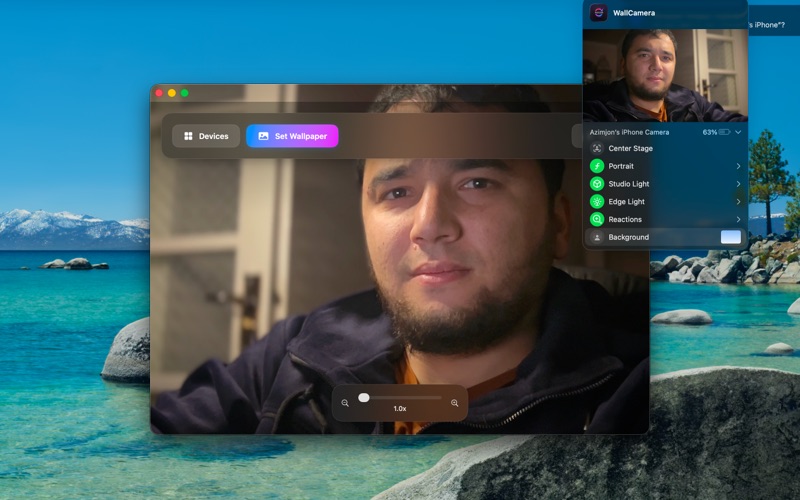
WallCamera transforms your camera into a stunning live wallpaper for your Mac.
Whether you use your built‑in FaceTime camera, an external USB/Thunderbolt camera or your iPhone via Continuity Camera, WallCamera turns your video feed into a beautiful, distraction‑free desktop background.
Live camera as your desktop wallpaper
Use your camera as a live desktop wallpaper on your Mac.
Ideal for creators, streamers, ambient setups or simply adding life to your workspace.
Works with built‑in and external cameras, including iPhone Continuity Camera.
High‑quality video (up to 4K)
Choose from multiple resolutions, including 4K, 1080p and more (depending on your camera).
Intelligent detection of supported resolutions for each device.
Optimized camera configuration for smooth, stable video.
Multi‑display support
Select which screens should use the live camera wallpaper.
Use your camera wallpaper on the main display only, or on multiple monitors.
Handles screen changes dynamically when you connect or disconnect displays.
Zoom & framing controls
Digital zoom controls to get the perfect frame.
Smooth zoom animations using a simple slider.
Quickly re‑frame your shot without touching your physical camera.
Focus & tap‑to‑focus
Tap directly on the live preview to focus on a specific area.
Switch between continuous auto‑focus and manual/locked focus modes.
Optional reset‑to‑center focus with a single action.
System video effects (when available)
Automatically detects system video effects provided by macOS and Continuity Camera, such as:
Portrait Mode
Center Stage
Studio Light (on supported devices)
WallCamera respects these effects so you look your best on screen.
Elegant, modern interface
Clean SwiftUI‑based design built specifically for macOS.
Animated background and premium‑style controls.
Onboarding screens to introduce the main features.
Settings panel for appearance, language and interface style (modern, professional, classic, minimal).
Simple workflow
Open WallCamera.
Allow camera access when prompted.
Select your camera and resolution.
Preview your video feed.
Click Set Wallpaper to activate live camera wallpaper.
Adjust zoom, focus and displays as needed.
Privacy‑friendly by design
WallCamera does not require an account.
No analytics SDKs or third‑party trackers.
Camera frames are processed locally and used only to render the wallpaper.
No video is uploaded, streamed, or stored by the app.
Bring your desktop to life with WallCamera.