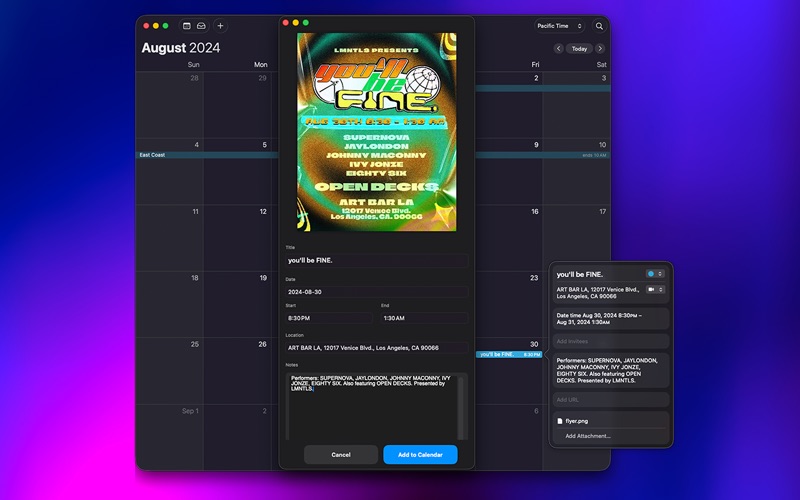
Turn any event flyer into a Calendar event in seconds.

HOW IT WORKS

1. Drop a flyer image onto the app, drag it to the menu bar icon, or right-click any image in Finder and choose Services → Add Flyer to Calendar.
2. Review the extracted event details and edit anything that needs fixing.
3. Press Add to Calendar. Done.

PRIVATE BY DEFAULT
No accounts. No tracking. Flyer images are sent to a secure processing server only to extract event details and are not stored. All other data stays on your Mac.

FLEXIBLE IMPORT
• Drag and drop images onto the app icon or window
• Right-click any image in Finder — Services → Add Flyer to Calendar
• Use the menu bar icon for quick access without switching apps
• Works from anywhere on your Mac via the Services menu

SMART EXTRACTION
• AI-powered extraction reads event title, date, time range, venue, and notes directly from the flyer image
• Handles real-world formats like "6–9 PM", "Sat, June 14", and full street addresses
• Falls back to on-device Apple Vision OCR if the server is unavailable
• Pre-fills everything so you can review and go

CUSTOMIZE YOUR WORKFLOW
• Optionally include extracted text in Calendar notes
• Optionally attach the original flyer image to the Calendar event
• Optionally archive flyers to a folder you choose
• Works with JPEG, PNG, and any image format your Mac supports

FLYER2CAL PRO
Try the app free with 10 conversions. Upgrade to Pro for unlimited conversions — one-time purchase, no subscription, restores with your App Store account.