



Description
NextBite turns food videos from your feed into a map you can actually use
NextBite turns food videos from your feed into a map you can actually use.

You find great restaurants on TikTok and Instagram—but they disappear when you scroll. NextBite lets you share a food video in a few taps and saves the restaurant, location, original video link, and dish recommendations in one place.

HOW IT WORKS

1. Find a restaurant video on TikTok or Instagram
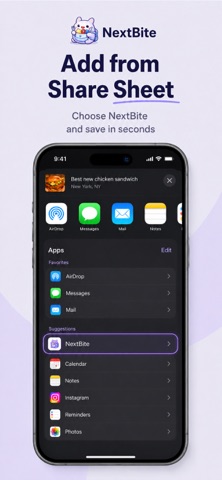
2. Tap Share and choose NextBite
3. NextBite processes the link in the background
4. Open your personal food map and saved list to plan your next meal

FEATURES

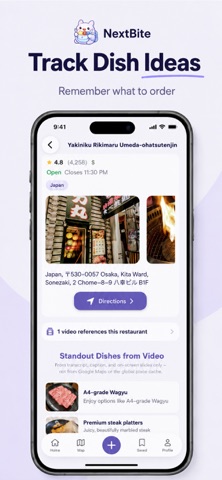
• Personal food map — See saved restaurants on a map with ratings and location details
• Share Extension — Save videos directly from TikTok and Instagram without leaving the app
• Restaurant + dish + video — Keep the place, what to order, and a link back to the original video
• Videos library — Track shared links and processing status
• Folders & sorting — Organize spots and sort by distance, price, or recently added
• Google Sign-In — Sync your saves securely across devices

REQUIREMENTS

• iOS 17.6 or later
• Google account
• Internet connection for processing shared links

SUPPORTED LINKS

Built for food videos from TikTok and Instagram. Some YouTube-style URLs may work depending on format.

PRIVACY & ACCOUNT

• Privacy Policy: https://next-bite-website.vercel.app/privacy
• Support: https://next-bite-website.vercel.app/support
• Delete your account anytime in Settings → Delete account

NextBite is not affiliated with TikTok, Instagram, Meta, or ByteDance. You are responsible for content you choose to share.
