


Description
Claudometer pins your token usage limits to your Home Screen, Lock Screen, and Today View
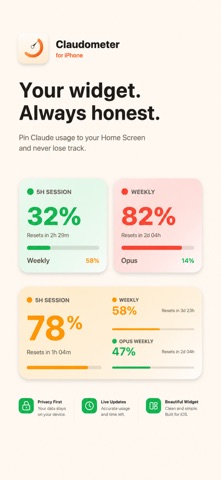
Claudometer pins your token usage limits to your Home Screen, Lock Screen, and Today View. No more guessing how much of your five-hour session you've burned through, or whether your weekly limit will hold until Sunday.

  Widgets, every size:
  • Small - your primary limit, big and obvious
  • Medium - Session, Weekly, and Sonnet Weekly side by side
  • Large - all three, plus a live 24-hour sparkline
  • Lock Screen circular, rectangular, and inline accessories
  • Configurable: pick which metrics to show, and which is primary

  Color-coded the instant it matters:
  • Green when you're safe
  • Orange as you approach the warning threshold
  • Red when you're near the limit
  • A small flame when your current pace will exceed the limit before reset

  One tap to refresh:
  AppIntent buttons let you reload your usage without opening the app.

  Privacy first:
  • Your session key is stored in the iOS Keychain
  • Nothing leaves your device except the requests needed to fetch your usage
  • No analytics, no third-party SDKs, no servers in between

  Also available on Mac:
  Claudometer for macOS shows the same usage in your menu bar with six icon styles, optional notifications at threshold
  crossings, and a popover with full detail.
