WireDesk is a macOS 26 photo workflow companion for photographers and editors who need to move quickly after a shoot
WireDesk is a macOS 26 photo workflow companion for photographers and editors who need to move quickly after a shoot. It is built for Apple Silicon Macs and focuses on the practical work that happens before final delivery: importing new images, reviewing a folder, marking selects, adding metadata, and sending files onward.

WireDesk works directly with image folders instead of requiring a catalog. Open a folder of JPG, JPEG, PNG, or HEIC images and start reviewing immediately in a stable thumbnail grid. Use familiar macOS selection behavior, keyboard shortcuts, star ratings, Tagged state, and color-based workflow classes to move through a set with less friction.

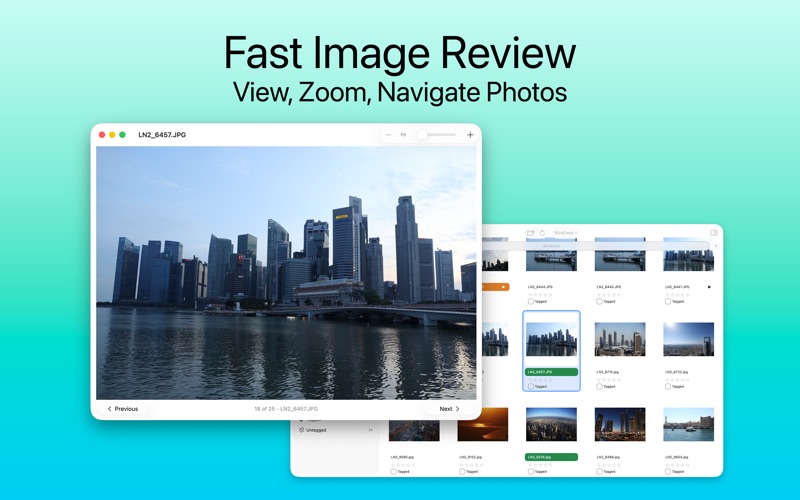
The app is designed for time-pressed review sessions. Keep multiple browser windows or tabs open for different folders, reopen recent folders, refresh when files change, reveal the active folder in Finder, copy paths, export image copies to a one-off destination folder, and hand selected images to your configured external editor. The preview window gives you fast Previous and Next navigation, zoom and pan controls, trackpad-friendly inspection, and context-menu actions for the current image so you can check detail without losing context.

For card ingest, WireDesk scans DCIM-based camera cards, identifies files that were already imported, and copies only new images into your chosen destination folder. Matching WAV sidecar audio notes are preserved, camera-tagged images can carry that intent into WireDesk, and source card files are not modified. You can optionally apply metadata during import and eject the card after a successful copy.

WireDesk includes IPTC and XMP metadata tools for editorial preparation. Edit IPTC metadata for a single image or across a selection, see mixed-value states when multiple files differ, apply only the fields you changed, and build reusable default metadata templates.

Supported IPTC fields include:

• Caption, description writer, headline, keywords, persons shown, title, intellectual genre, category, and supplemental categories.
• Creator / photographer, creator job title, credit, source, copyright, copyright URL, and rights usage terms.
• Event, time and date, city, location, state / province, country, ISO country code, IPTC subject code, job ID / trans ref, and special instructions.

The interface follows modern macOS 26 conventions with a focused desktop layout, native window behavior, System, Light, and Dark appearance options, configurable image caching, and a Help window with workflow guidance.

WireDesk Pro Lifetime adds WireDeskAI, an on-device AI culling workflow for faster review, along with deeper template workflows including importing XMP templates, saving reusable XMP template files, choosing templates during card import, and customizing workflow class names.

Key workflows:
• Import new files from DCIM-based camera cards.
• Browse image folders directly, without catalog setup.
• Review and select images with ratings, tags, workflow classes, and keyboard shortcuts.
• Inspect images in a dedicated preview window with zoom, pan, navigation controls, and current-image context actions.
• Export copies of selected images to a chosen destination folder.
• Edit IPTC metadata for one image or a selection.
• Build default metadata and reusable templates.
• Preserve matching WAV sidecar audio notes during import.
• Open selected images in your configured external editor.
• Manage recent folders, image caching, and import behavior from Settings.

WireDesk keeps the workflow close to your files while giving you the structure needed for repeatable ingest, review, metadata entry, and editorial handoff.


Privacy:
WireDesk respects your privacy. It does not collect or transmit personal data; app settings, bookmarks, and cache data remain local to your Mac. WireDeskAI runs on-device and does not upload your images or metadata to an online AI service.