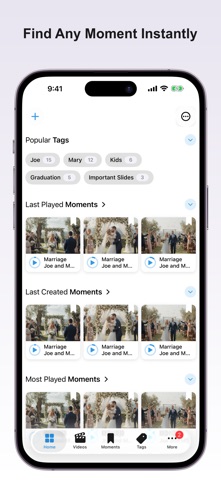
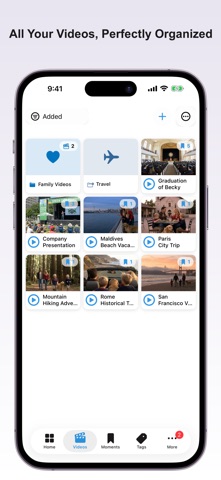
Jump to any moment in your videos in 1 tap.
No more scrubbing. No more guessing.

Key Moments lets you save exact scenes as visual bookmarks — and instantly jump back to them anytime.

—

HOW IT WORKS

1. Watch
Play your video in the built-in player.

2. Save
Tap once to capture the exact moment as a visual bookmark.

3. Jump back
Tap the screenshot to instantly return to that moment.

—

WHY IT'S FASTER

• Visual Video Bookmarks
Screenshots aren't just images — they're precise entry points into your video.

• Scenes
Mark and name whole segments as you watch — then replay, loop, or export them as standalone clips. Scenes show right on the player timeline and in their own tab.

• One-Tap Capture
Save the perfect frame instantly, without interrupting playback.

• Smart Organization
Tags and smart folders automatically keep your moments organized.

• Powerful Home Tab
Jump straight to your most watched and recently played moments.

• AirPlay Support
Stream to Apple TV while keeping full playback control on your device.

• Backup & Restore
Export your entire library and import it on any device.

• Sync Across Devices
Your videos and moments stay in sync on iPhone, iPad, and Mac via iCloud.

• Private by Design
No cloud. No uploads. Your videos stay on your device.

• Beautiful Themes
Choose from Default, Lavender, Sage, or Rose.

—

PERFECT FOR

• Learning — revisit explanations instantly
• Personal videos — relive your best moments
• Work — bookmark key points in meetings
• Creators — mark scenes before editing

—

Save it once. Jump back anytime.

Available on iPhone, iPad, and Mac.

Terms of Use: https://getkeymoments.com/terms.html