Stop scrubbing through hours of footage to find the good bits.

Clipolette watches your long video for you, finds the moments worth
posting, and turns them into vertical 9:16 clips for TikTok, Reels, and
Shorts. Podcasts, interviews, livestreams, sermons, webinars, lessons,
gameplay, or one long take on your phone — drop it in and let it do the
hunting.


HOW IT WORKS

1. Add your video from Photos or Files.
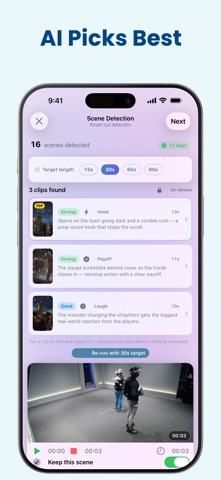
2. AI finds your best moments and ranks them — best first.
3. Tap any clip to fine-tune it.
4. Export and post. One long video becomes several clips.


AI FINDS YOUR BEST CLIPS

Pick your length — 15, 30, 60, or 90 seconds — and on-device AI reads
what's actually said, then picks the moments worth cutting. It listens
for laughter, applause, cheers, and the moments your delivery gets loud
and fired up, so big reactions never slip by. Every clip tells you why it
was picked, with an honest strength rating — and if nothing really stood
out, it says so instead of faking a favorite.

Powered by Apple Intelligence — fully private, fully offline.


POST KIT: HOOK, CAPTION & HASHTAGS

Add captions, then tap Post Kit — on-device AI writes your clip's
packaging from what's said: a scroll-stopping on-screen hook, plus a
ready-to-paste caption and hashtags.


MADE VERTICAL, AUTOMATICALLY

Any landscape clip becomes crisp 9:16. Choose how it's framed:

• Crop — Fast or Deep centers the frame on the faces it finds. Follow
  Subject pans to keep your subject in frame as they move, and switches
  to whoever's speaking when several people share the shot. No face in
  view? It follows the action, so gameplay and cooking stay centered.
• Style — Tight Crop fills the frame; Blurred Fill keeps your whole shot
  with a soft blurred background top and bottom.
• Manual — pan and zoom by hand when you want the final say.

See exactly how it'll look before you export — Safe Zones show what
TikTok, Reels, and Shorts buttons cover.


ONE-TAP POLISH

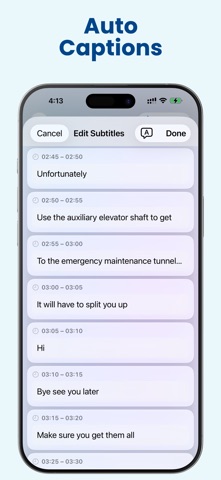
• Subtitles — auto-captions with word-by-word animation and five
  TikTok-ready styles. Translate them in a tap, or fix a word across
  every caption at once with Find & Replace.
• Tighten Pauses — cut the dead air between sentences, with your
  captions staying perfectly in sync.
• Remove Fillers — cut the "ums" and "uhs" with one tap.
• Slow Motion — add ½× or ¼× slow motion to any scene.
• Enhance — upscale lower-res clips toward crisp 1080p, on your device.


SCENE BY SCENE

Clipolette splits your video into scenes automatically. Keep the ones you
want, delete the rest. No manual cutting required.


PICK UP WHERE YOU LEFT OFF

Projects save automatically. Reopen one from the home screen and your
scenes and AI clips are ready instantly — no re-scanning.


WALK AWAY WHILE IT WORKS

Switch apps or lock your screen — a long analysis or export keeps
running. Come back when it's done.


WHY CREATORS LOVE IT

• Private by design — no account, nothing sent to us, and AI runs fully
  on your device.
• Every editing tool is free. No subscriptions, ever.
• One-time purchase to remove the export watermark — pay once, keep it
  forever.
• All-in-one — convert, trim, crop, slow down, tighten pauses, enhance,
  caption, translate, and export, all in one place.

Short clip instead of a long one? That works too.


REQUIREMENTS
Clipolette works on iPhone and iPad with iOS 18.2 or later.
• Finding your best clips is powered by Apple Intelligence — it needs a
  device that supports it, on iOS 26 or iPadOS 26. Post Kit works
  everywhere, and uses Apple Intelligence on those same devices.
• Smoother (ML) slow motion, saved projects, and running in the
  background while you switch apps all need iOS 26 or iPadOS 26.
  Enhance needs iOS 26 and a device that supports it — it only appears
  when it can actually run.
• Everything else — auto-captions, translation, reframing, scene
  detection, trimming, and basic slow motion — works on iOS 18.2 and
  later.