Sentry Clip Viewer brings your Tesla dashcam footage to life with multi-camera synchronized playback, real-time telemetry visualization, and professional export
Sentry Clip Viewer brings your Tesla dashcam footage to life with multi-camera synchronized playback, real-time telemetry visualization, and professional export. Browse clips directly from your NAS, USB drive, or local storage on iPhone, iPad, and Mac.

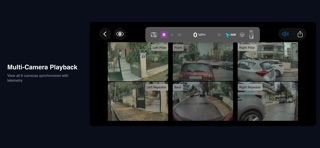
MULTI-CAMERA SYNCHRONIZED PLAYBACK
- 4 cameras for AI3, 6 cameras for AI4
- Tap any camera to expand fullscreen
- Swipe left/right to switch cameras, double-tap or swipe down to exit
- Long-press to hide cameras; grid auto-adjusts
- Filter clips by Sentry, Saved, or Recent
- Smooth 30fps synchronized playback

NAS & NETWORK DRIVE SUPPORT
- Browse clips directly from QNAP, Synology, and other NAS devices
- Native SMB connection — no need to copy files to your device
- Smart local caching for smooth playback over WiFi
- Configurable cache size with easy management
- Works on iPhone, iPad, and Mac

MAC SUPPORT
- Runs natively on macOS 13+ via Mac Catalyst
- Native folder selection and keyboard shortcuts
- Menu bar integration and optimized interface
- Perfect for reviewing footage on a larger screen

USB IMPORT
- Connect via Lightning or USB-C adapter
- Per-file progress with real-time updates
- Automatic duplicate detection
- Preserves TeslaCam folder structure

CONTINUOUS CLIP MERGING
- Automatically detects consecutive 1-minute clips
- Seamless playback across multiple clips
- Export merged clips as single video

PLAYBACK SPEED CONTROL
- 0.25x to 2x speed for detailed analysis or quick review

TESLA-STYLE TELEMETRY OVERLAY
- Location panel with reverse geocoding
- Speed, steering wheel, autopilot status
- Color-coded: Blue=FSD, Green=Autosteer, Orange=TACC
- Throttle/brake bar, turn signals, gear position
- GPS mini map, G-force meter, compass
- Flexible positioning with corner placement options

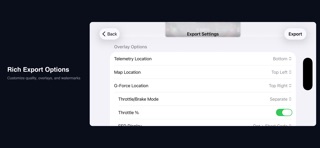
ENHANCED EXPORT EXPERIENCE
- True WYSIWYG preview with live overlay rendering
- Multi-camera grid preview before export
- In/Out point markers for range selection
- Quality presets: Original, 75%, 50%, 25%
- 256-color watermark customization
- Independent overlay controls for map and G-force

DRAGGABLE OVERLAYS
- Drag any panel anywhere on screen
- Double-tap to reset position
- Pinch to resize map and G-force
- Toggle visibility of each element

TESLA SOUND EFFECTS
- Autopilot chimes: Autosteer, TACC, and FSD activation/deactivation
- Turn signals: Realistic blinker tick at Tesla's 680ms interval
- Gear shifts: Park and Reverse engagement sounds
- Hard braking: Forward collision warning for heavy deceleration
- Pedestrian warning: Reverse low-speed alert loop
- Speaker toggle in playback toolbar; volume control in export

PROFESSIONAL VIDEO EXPORT
- Real-time export preview showing exact output
- Customizable HUD display modes
- Corner positioning for overlays
- Tesla-style telemetry integration

FORENSIC PDF REPORTS
- 2-3 page professional documentation
- Clip info, vehicle state, GPS, G-force
- Route map with waypoints and direction arrows
- Speed, throttle/brake, steering graphs
- Power & Throttle graph (TeslaMate only)

IPAD OPTIMIZED
- Split view: browse clips while watching
- Keyboard shortcuts (iOS 17+)
- Larger export preview display

THIRD-PARTY TELEMETRY
- Tessie, TeslaScope, and TeslaMate support
- Simplified authentication with OAuth 2.0 (TeslaScope)
- Battery %, temperature, elevation, odometer
- Power consumption (TeslaMate only)
- Auto-detects km/mi from TeslaMate settings
- Data cached locally for offline access

PRIVACY FIRST
- 100% on-device processing
- No data collection or tracking
- No account required (except optional telemetry providers)

REQUIREMENTS
- Tesla with AI3 or AI4 computer
- Firmware 2025.44.25+ for telemetry
- iOS 16.0+ / macOS 13.0+

Join Tesla owners worldwide who trust Sentry Clip Viewer for dashcam analysis and incident documentation.