Forge Journal is an all in one stock trading journaling app that helps you compile, monitor and visualize your investing performance in a tool that runs entirely locally on your computer
Forge Journal is an all in one stock trading journaling app that helps you compile, monitor and visualize your investing performance in a tool that runs entirely locally on your computer!

DASHBOARD
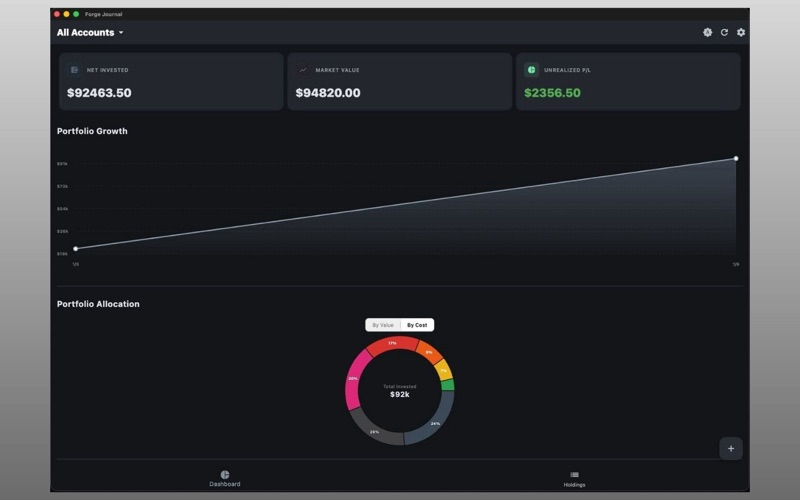
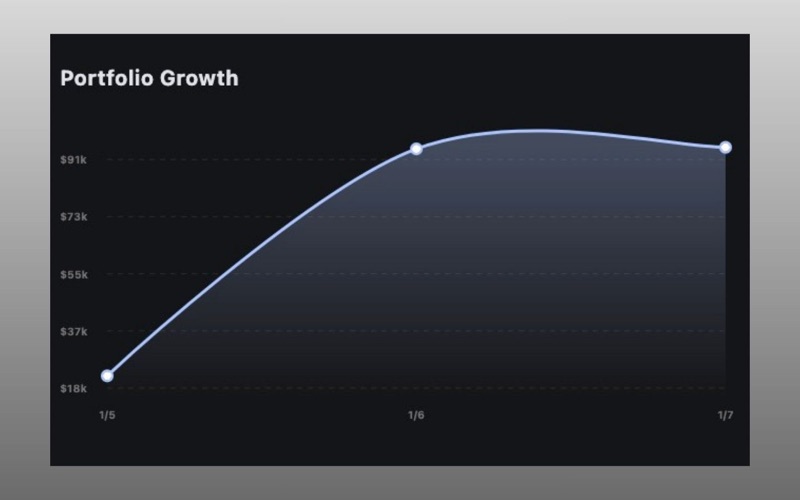
In Forge Journal, you'll find a visual Dashboard that automatically generates charts and graphs based on the trades you upload to your portfolio. Track your portfolio growth overtime with the HISTORY graph that logs the net account value each day the app is opened. The ALLOCATION pie chart shows you what percentage of your accounts are exposed to each of your individual holdings so you can reach your desired risk exposure. With this chart, you can monitor how your allocation changes over time based on the initial costs of your investments versus the current value of the holdings to reflect real time insights for your evaluation. With the WINNERS & LOSERS series chart, you get an immediate reflection of your top and bottom performing holdings at a glance.

MULTIPLE ACCOUNT SUPPORT
Forge Journal allows you to create multiple sub-portfolio accounts easily in the Settings screen. Have multiple brokerage accounts for trading or long term investing? Want to monitor your households holdings? You can easily accomplish this in Forge Journal. You can even break down your Dashboard widgets on a sub-account level & the totality view with the tap of a button.

LOCALLY RUNNING APPLICATION
Forge Journal operates entirely locally on your Mac. This means that you don't need to create any accounts or share any personal information with anyone! All of your information is saved on your machine and the app doesn't transmit back to any of your data to external or cloud servers.

CASHFLOW BASIS ACCOUNTING
Forge Journal shows your cost basis in terms of net cash flow per ticker. This helps you view your holdings in an "Effective Price per Share" manner that reflects money coming in through dividends, purchases and sales providing a superior level of insight into your lifetime performance.

IMPORT OR MANUALLY ADD TRANSACTIONS
Forge Dashboard now supports .csv file imports for transaction and trade data along with the manual transaction inputs. The system quickly processes through trade data and updates your portfolios accordingly.

EXPORT TRANSACTION DATA
You have the ability to quickly export and download your transaction data in app to a .CSV file right from the Settings screen.

 LIGHT & DARK MODE SUPPORT
Forge Journal supports your system preference for light or dark mode in an elegant manner giving you control into how your application looks and feels.