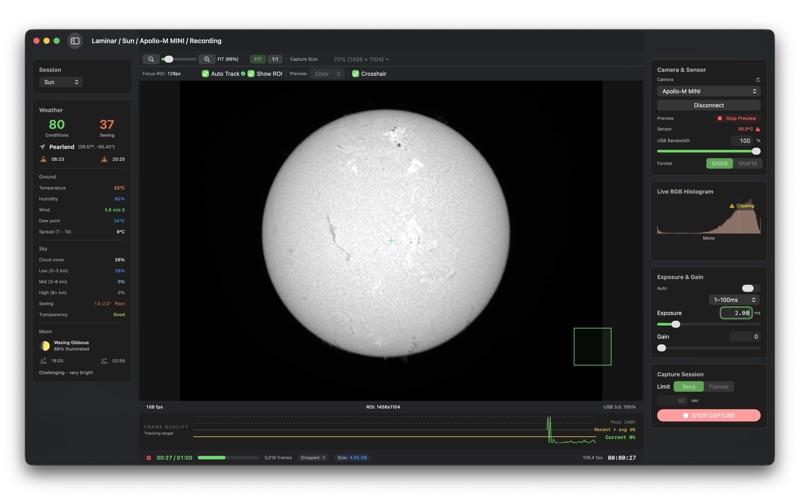
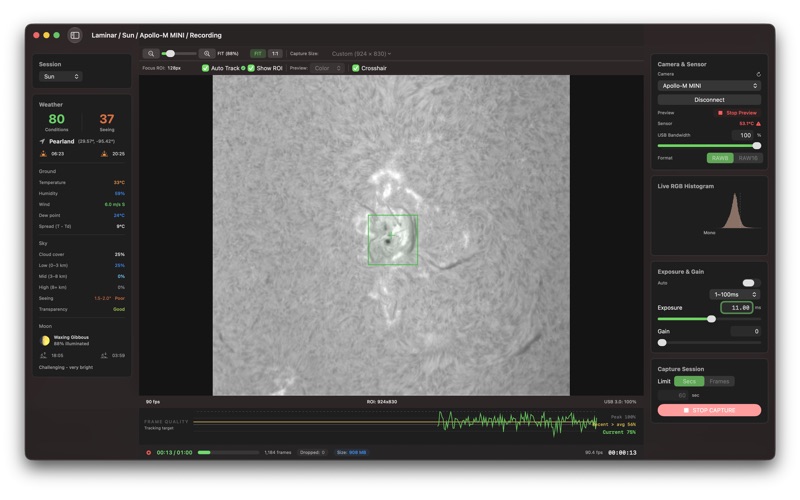
Laminar is the first native macOS planetary and solar imaging capture app built for Apple Silicon
Laminar is the first native macOS planetary and solar imaging capture app built for Apple Silicon. Record high-framerate video of planets, the Moon, and the Sun through your telescope — no Windows, no virtual machines, no compromises.

Built for the proven workflow: capture thousands of frames as raw SER video, then stack the sharpest in AutoStakkert, Registax, PIPP, or SIRIL. Laminar handles capture.

CALIBRATION
Apply dark, flat, and hot pixel correction to your live preview and, optionally, your recorded files. Build masters with guided capture wizards or import existing FITS, TIFF, PNG, and SER masters; a per-camera library auto-matches the right one.

CUSTOM ROI & SOLAR SCANNING
Draw a region of interest right on the live preview — drag it, resize with handles, or type exact pixel dimensions. Narrow horizontal strips drive spectroheliograph (SHG / Sol'Ex) scanning, reading a thin sensor slice at very high frame rates. Save any region as a reusable preset.

CAMERA SUPPORT
Laminar supports USB-connected astronomy cameras from 10 brands via direct SDK integration:
Production (fully tested):
ZWO ASI — all ARM64 USB models (SDK v1.41)
PlayerOne — all models
ToupTek Astro and OEM partners — Altair Astro, OGMA, RisingCam, MallinCam, Omegon
SVBONY — SV305, SV505C, SV705C, SV605, SV905C
Beta (shipping with active validation):
QHY — QHY5III planetary series, QHY268, QHY600, QHY533, QHY294
Plus USB Video Class (UVC) webcams via AVFoundation, and iPhone or iPad via Continuity Camera — for afocal capture through an eyepiece adapter (Beta).

Not compatible: ZWO Air cameras (ASI585MC Air, etc.) and ASIAir controllers are WiFi-only and cannot connect — use the ASIAIR app or ASIStudio. The non-Air versions of those sensors (ASI585MC, ASI662MC, ASI678MC) are fully supported.

Camera controls adapt automatically — exposure, gain, white balance, cooler, USB bandwidth, and high-speed mode appear only when your camera supports them.
REAL-TIME QUALITY ANALYSIS

Every 4th frame is scored using Laplacian variance — the same focus metric used by stacking software. A live graph shows instantaneous quality, rolling average, and session peak so you can time captures to steady seeing.

TARGET-AWARE CAPTURE
Select from 10 imaging targets. Each configures rotation-safe capture limits — Jupiter gets a 60-second window before rotation smears detail, Saturn allows 120 seconds. A traffic-light indicator warns if your capture runs too long.

AUTO FOCUS TRACKING
Planets: brightness-weighted centroid tracking follows the target as it drifts. Moon and Sun: GPU-accelerated template matching locks onto a crater, sunspot, or terminator feature you select.

SKY QUALITY SCORE
Two scores (Conditions and Seeing, 0–100) from cloud cover, humidity, wind, seeing, and transparency via Open-Meteo and 7Timer.

METAL GPU PREVIEW
Bayer demosaicing runs on Metal compute shaders at 10–50x CPU speed. Live preview runs at your display's refresh rate — 60Hz, higher on ProMotion. Toggle between full-color and raw grayscale for fine focus.

CAPTURE-FIRST ARCHITECTURE
The camera-to-disk path runs independently of the interface. Under thermal throttling — common in long solar sessions — the preview slows before a recorded frame is dropped. Your SER file keeps writing at full sensor speed.

ALSO INCLUDES
Live RGB histogram with per-channel clipping detection
Camera-side white balance with per-channel control
Moon phase, illumination, and rise/set times
Sensor temperature monitoring with safety shutoff
Dew risk alerts from temperature-dewpoint spread
Frame drop detection for USB bandwidth issues
SER file playback with full transport controls
QuickLook plugin — preview SER files in Finder
macOS notifications for capture events
Diagnostic logging with one-tap export

PRICING
$34.99, one-time purchase. No subscription. All features included.

REQUIREMENTS
macOS 14.6 (Sonoma) or later. Apple Silicon Mac (M1+). A supported USB astronomy camera (see Camera Support above).