



Description
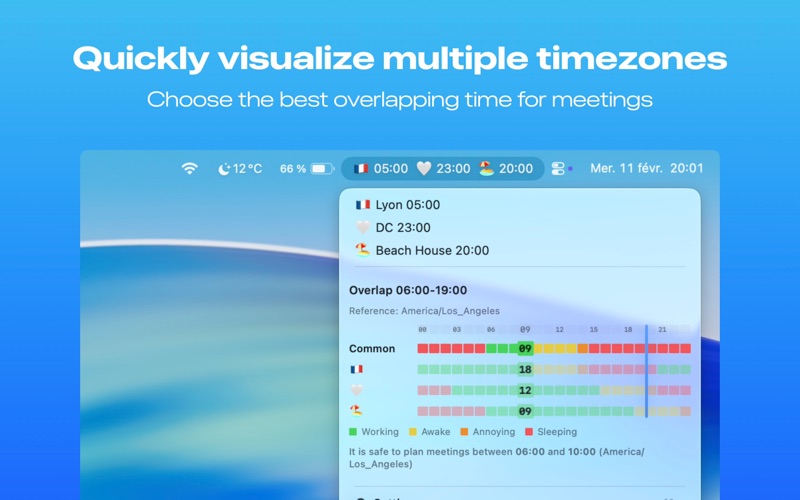
TimeBar lives in your Mac menubar and shows the current time in all your favorite places—so you never have to guess when it’s morning in Tokyo or evening in Paris
TimeBar lives in your Mac menubar and shows the current time in all your favorite places—so you never have to guess when it’s morning in Tokyo or evening in Paris.

MULTIPLE TIME ZONES
Add as many locations as you need. Each one appears with a flag (or a short trigram), name, and live time. Choose between emoji or compact trigram display to fit your menubar.

FIND THE BEST TIME TO MEET
Open the overlap view to see a 24-hour timeline of everyone’s availability. Working hours, sleep, and “annoying” hours are color-coded. Spot the green overlap—that’s your best meeting window. A right-hand marker shows where you are in the day.

QUICK SHARING
Click any slot to copy the timezone and local times to your clipboard, ready to paste into an email or calendar invitation.

SETTINGS THAT MATTER
• 12h (AM/PM) or 24h time format
• Custom work hours for overlap visualization
• Reorder time zones by drag and drop
• Edit locations anytime: flag, name, trigram, timezone

Simple, fast, and made for people who work across the globe.

TimeBar is brought to you with care from France.
