R2Drop is the fastest way to upload files to Cloudflare R2 from your Mac.

Right-click any file in Finder → Send to R2. Drop files on the menu bar icon. Paste a path in the terminal. All three methods hit the same upload queue, share the same config, and copy the public URL to your clipboard the moment the upload finishes.

No browser. No dashboard. No context switching.

--
UPLOAD YOUR WAY
--

• Finder right-click — select "Send to R2" from the context menu on any file or folder
• Drag to menu bar — drop files directly onto the R2Drop icon
• Drag into app — drop into the Uploads tab for a visual queue
• File picker — browse and select via standard macOS file dialog
• CLI — r2drop upload ./file.png from any terminal or script
• Deep links — trigger uploads from Alfred, Raycast, or Shortcuts via r2drop://

--
BUILT FOR LARGE FILES AND FOLDERS
--

R2Drop uses multipart uploads with a configurable chunk size (5–100 MB) and runs up to 16 parallel streams. Uploading a folder recursively preserves the directory structure. Common junk files (.DS_Store, __MACOSX, .env) are filtered automatically.

--
MULTI-ACCOUNT SUPPORT
--

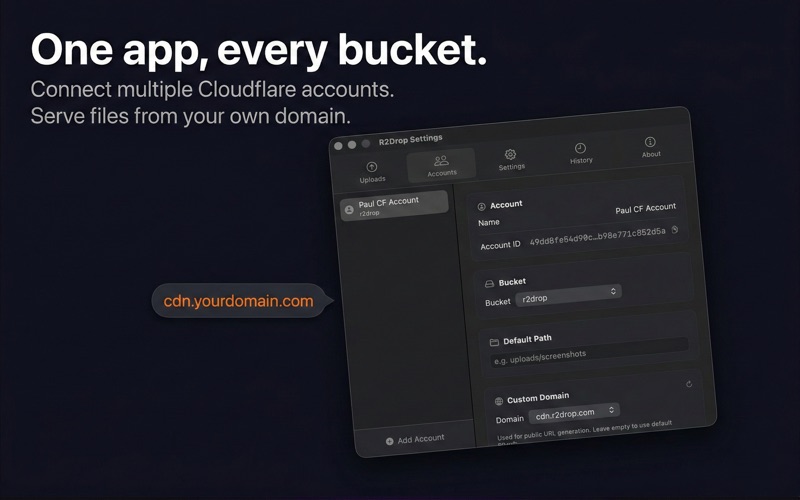
Add as many Cloudflare accounts and R2 buckets as you need. Switch the active account from the menu bar in one click. Each account has its own bucket, optional path prefix, and optional custom domain for public URLs.

--
SECURE BY DESIGN
--

Your Cloudflare API tokens are stored exclusively in macOS Keychain. They are never written to config files or transmitted to R2Drop's servers. The app is sandboxed and notarized.

--
HISTORY AND SEARCH
--

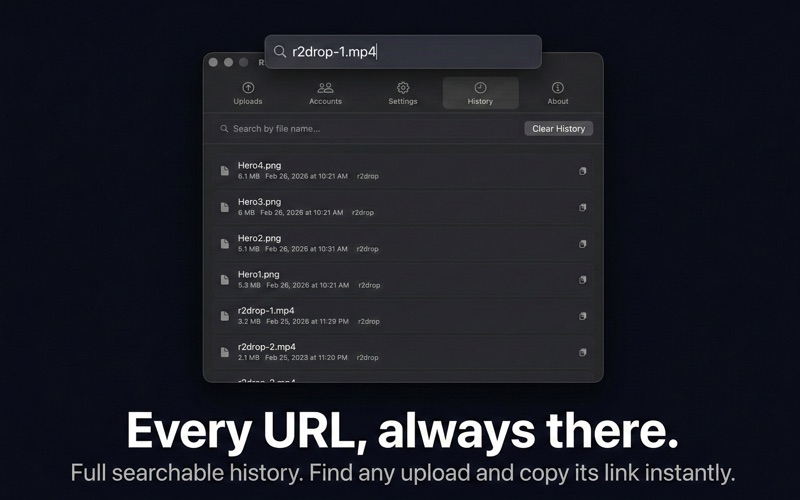
Every upload is logged with its filename, size, destination, timestamp, and public URL. Search your full history instantly — find and re-copy any URL without re-uploading.

--
CLI COMPANION
--

Install the r2drop CLI from inside the app (Settings → Install CLI). The CLI reads the same config file as the app — no separate setup. Use it in build scripts, CI pipelines, or shell workflows:

  r2drop upload ./dist --compress
  r2drop upload ./screenshot.png

--
PERFORMANCE SETTINGS
--

• Concurrent uploads: 1–16 (default 4)
• Chunk size: 5–100 MB (default 8 MB)
• File exclusion patterns: glob-based, fully customizable

--
AUTOMATIC UPDATES
--

R2Drop uses Sparkle for automatic updates. Toggle auto-check on or off, or check manually from the About tab.

--

R2Drop is open source. Issues and contributions welcome at github.com/superhumancorp/r2drop.