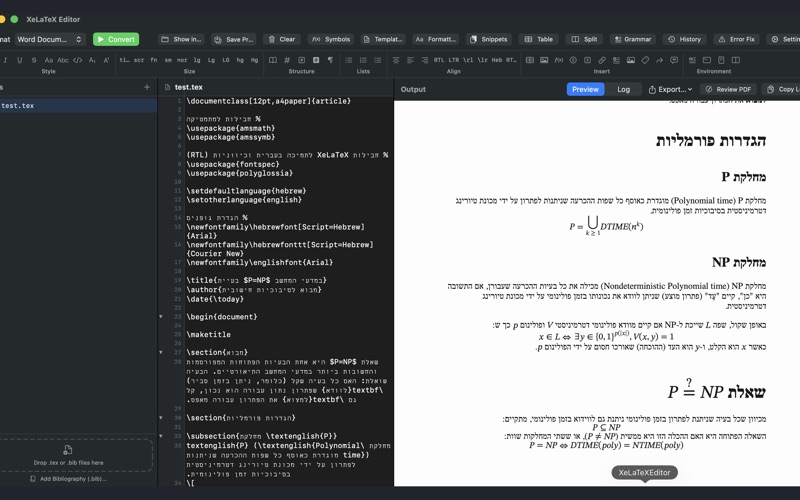
XeLaTeX Editor converts LaTeX documents to Word (.docx), HTML, and PDF — entirely on your Mac. Built on a custom Swift conversion engine, it gives researchers, students, and academics a fast, native way to turn .tex files into publication-ready documents.

CONVERT WITH CONFIDENCE

LaTeX to Word — tables, equations, citations, and formatting preserved
LaTeX to PDF — professional typesetting with built-in PDF annotation tools
LaTeX to HTML — clean output with MathML equation rendering
Live preview updates as you type with click-to-navigate between source and output
Bibliography support — attach .bib files for automatic citation processing
POWERFUL SOURCE EDITOR

Real-time syntax checking with error underlines and tooltips
\ref{} and \cite{} autocomplete from your labels and bibliography
Code folding — collapse environments and sections to focus on your writing
Grammar and style checker — flags passive voice, wordiness, jargon, and long sentences
Split editor — view two files side by side
Drag and drop images to insert \includegraphics automatically
Find and replace with incremental search
AI ASSISTANT

On-device AI powered by Apple Intelligence helps write LaTeX, fix errors, and explain commands
Quick actions: Fix Errors analyzes your conversion log, Explain Selection breaks down selected code
Insert AI-suggested code directly into your editor
Completely private — runs locally, nothing leaves your Mac
WRITING TOOLS

Symbol Picker — browse and insert 200+ LaTeX symbols from a visual grid
Snippet Library — 22 built-in code fragments with tab-stop placeholders, plus custom snippets
Visual Table Editor — design tables in a spreadsheet-like grid with booktabs support
Template Browser — start from 8 academic templates (article, thesis, beamer, CV, and more)
Formatting toolbar — bold, italic, sizes, alignment, sections, lists, and environments
PDF ANNOTATIONS

Review your PDF output directly in the app
Highlight, add notes, and strikethrough text
Save annotated copies for self-review or peer feedback
PROJECT MANAGEMENT

Save and reopen multi-file projects (.tex and .bib together)
File sidebar with conversion status indicators
Export to any format from the output panel
PRIVACY FIRST
All processing — including AI — happens locally on your device. Your documents are never uploaded anywhere. No accounts, no tracking, no analytics. No terminal, no dependencies, no configuration. Just open your .tex file and go.

Requires macOS 14 or later. AI Assistant requires macOS 26 with Apple Intelligence enabled.