Flick puts all your Python and shell scripts in the menu bar — one click to run, no terminal required
Flick puts all your Python and shell scripts in the menu bar — one click to run, no terminal required.

If you write scripts to automate your Mac but spend more time hunting them down than using them, Flick is for you. Add scripts once, then run them anytime from a focused launcher that lives quietly in your menu bar.

WHAT YOU CAN DO WITH FLICK

• Run any .py or .sh script instantly — no terminal window, no path hunting
• Watch live output (stdout and stderr) stream right inside the panel as your script runs
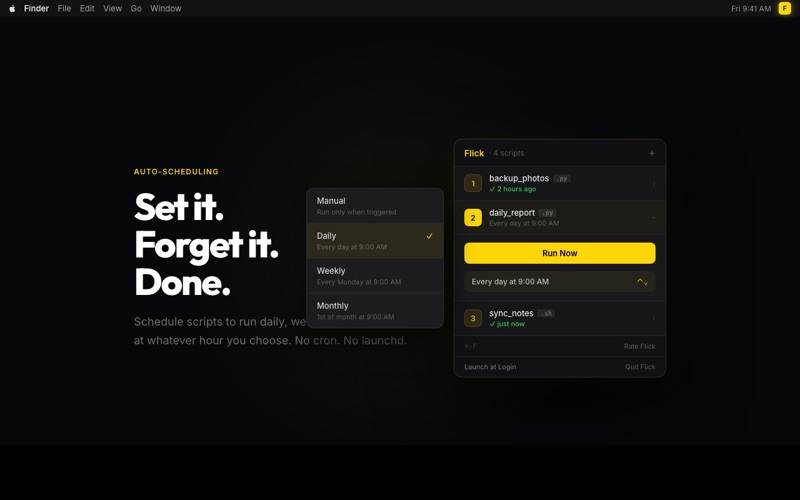
• Schedule scripts to run daily, weekly, or monthly at a time you choose
• Review the last 10 runs per script — timestamps, duration, exit codes, and full output
• Open Flick from anywhere with the global shortcut ⌘⇧F
• Trigger your top 9 scripts with a single number key (1–9)
• Get a notification when a scheduled script completes
• Rename scripts to something readable without touching the file itself
• Enable Launch at Login and Flick is always ready — no manual startup
• Scripts that have moved or been deleted are flagged immediately in orange
• Scripts that call APIs or fetch data from the internet work out of the box

BUILT FOR DEVELOPERS WHO SCRIPT

Flick was built by someone who kept writing useful Python scripts and then immediately losing track of them. File cleanups, daily reports, API calls, backup routines — if you're automating your Mac with scripts, Flick gives them a permanent home that's always one keypress away. No bloated launchers, no complex setup. Just your scripts, exactly where you need them.

PRIVATE BY DESIGN

Flick itself never connects to the internet and collects nothing about you — no analytics, no telemetry, no crash reporting. Your scripts, schedules, and run history stay entirely on your machine. When your scripts make network requests (API calls, data fetches), that traffic goes directly from your script to its destination. Flick never sees it. Fully sandboxed through the Mac App Store.

$3. One-time purchase. No subscription, ever.

Note: Due to macOS App Sandbox restrictions, scripts that write files to their own folder may encounter permission errors. Scripts that read, process, and output data work without limitation.