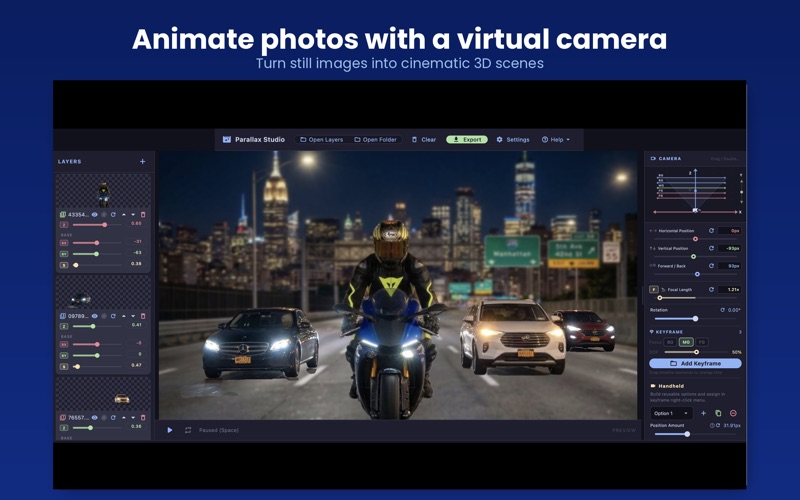
ParallaxStudio lets you create depth-driven animations from layered images — without complex animation software
ParallaxStudio lets you create depth-driven animations from layered images — without complex animation software.
Build immersive scenes, animate real camera movement, and export high-quality videos in minutes.
Perfect for photographers, filmmakers, designers, and motion artists who want cinematic motion from still images.

Key Features

Real-Time 3D Parallax
Create natural depth and perspective as layers respond differently to camera movement.

Layer-Based Scene Building
Import layered images and arrange each layer with BX, BY, Scale, and Depth controls.
Reorder, hide, or remove layers anytime.

Cinematic Camera Animation
Animate with pan, dolly, focal length, and more to create immersive motion from still images.

Flexible Keyframe Workflow
Record camera animation on the timeline with smooth interpolation between keyframes.
Add layer animation when needed by adjusting layer values on selected keyframes.
Assign handheld motion profiles for extra realism and subtle camera shake.

High-Quality Export
Render your final animation directly to MP4 in 1080p or 4K.

Ideal for:
Photographers
Video creators
Designers
Motion artists
Anyone who wants cinematic movement from still images

Best Results
Use layered PNG images with transparent backgrounds.
Keep all layers at the same canvas size.
Place main subjects near the center of the frame for the most natural parallax effect.

How It Works

1. Import layered images
Add foreground, midground, and background layers.

2. Build your scene
Set BX, BY, Scale, and Depth for each layer.

3. Animate the camera
Preview motion using camera controls and parallax depth.

4. Add keyframes
Record camera animation along the timeline.
Adjust layer values on selected keyframes only when extra layer animation is needed.
Configure handheld profiles for additional motion.

5. Export
Render your finished shot to MP4.

* Important:
Scene setup values are not automatically preserved as the first layer keyframe. If you may want to animate a layer later, turn on that layer’s keyframe toggle before starting scene setup, even if you are not changing BX, BY, Scale, or Depth yet. If you enable it later, the original scene layout may not be preserved as the starting state.