





Description
NanoClip is a fast, keyboard-first clipboard manager that lives in your menu bar
NanoClip is a fast, keyboard-first clipboard manager that lives in your menu bar. Search everything you copied — text, images, links, files, code, and colors — and paste any of it with a keystroke.

Hit your hotkey to bring up the picker, type to search, press Return to paste.

CLIPBOARD HISTORY
Every copy is saved automatically. Search through your history instantly by typing, scroll back through time-grouped entries, and paste anything with a keystroke. Pin important items so they are always at the top.

SMART SNIPPETS
Save reusable text templates with dynamic placeholders. Open the snippet picker, find your snippet, and paste it instantly. Snippets support custom arguments that you fill in before pasting — perfect for email signatures, code templates, canned replies, or anything you type often.

FLOWS
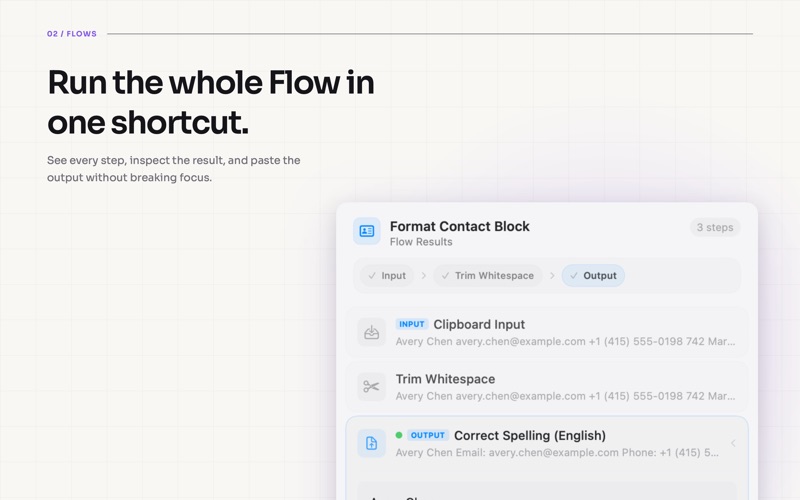
Run small clipboard workflows without opening a separate automation app. Clean up text, format JSON, transform URLs, OCR images, summarize or rewrite copy, translate content, and chain steps together into your own custom flows.

EDIT IN PLACE
Press Cmd+E to edit any clipboard item inline. Fix a typo, tweak a URL, update a value — then paste the modified version. Your edits are saved to history.

SEQUENTIAL PASTE
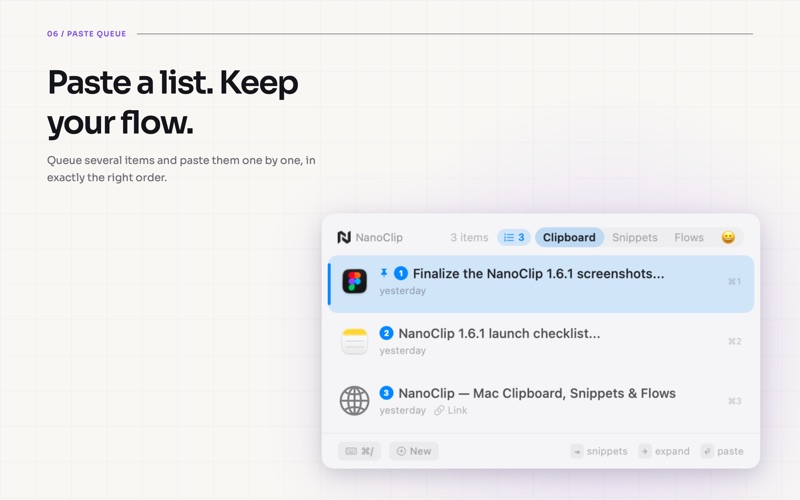
Queue up multiple items and paste them one by one in order. Perfect for filling out forms, transferring data between apps, or batch-pasting a list of values.

RICH LINK PREVIEWS
Copied URLs automatically show titles, favicons, and preview images so links are easier to recognize later.

PERSONAL STATS
Track your clipboard habits with daily streaks, busiest hours, top apps, content type breakdowns, and flow usage. See how you use your clipboard — visualized.

20 THEMES & 14 FONTS
Choose from Catppuccin, Nord, Dracula, Tokyo Night, Cyberpunk, Synthwave 84, Liquid Glass, and more. Pick your favorite font — Inter, JetBrains Mono, Sora, and 11 others.

iCLOUD SYNC
Your clipboard history and snippets sync across all your Macs via iCloud. No accounts, no servers, no setup.

PRIVACY FIRST
Content obfuscation hides sensitive items like passwords and API keys. Clipboard history stays on your device or in your private iCloud. Cloud AI flows only send content when you choose to run one with a configured provider.

KEYBOARD-FIRST DESIGN
Navigate, search, edit, pin, queue, run flows, and paste — all without touching your mouse. Every action has a keyboard shortcut.

---

Free version includes clipboard history (last 5 items), 3 snippets, 3 flows, and 1 theme.

NanoClip Pro is a one-time in-app purchase that unlocks unlimited history, unlimited snippets, custom flows, sequential paste, all themes and fonts, iCloud sync, and content obfuscation. Pay once, yours forever.

Privacy Policy: https://getnano.dev/privacy
Terms of Use: https://getnano.dev/terms
Support: [email protected]
