VisionBlitz turns stacks of scanned documents into searchable text and Relativity-ready loadfiles
VisionBlitz turns stacks of scanned documents into searchable text and Relativity-ready loadfiles. Without sending a single page to the cloud. Point it at a folder, pick your export format, and get clean, predictable output in minutes.

Built for legal teams, paralegals, and litigation support professionals who need to process evidence on deadline and hand it off to any review platform.

WHAT IT DOES
• Batch OCR entire folders of documents in one pass
• Extract text from TIFF, PDF, PNG, JPG, BMP, GIF, and HEIC
• Process multi-page PDFs with parallel per-page recognition
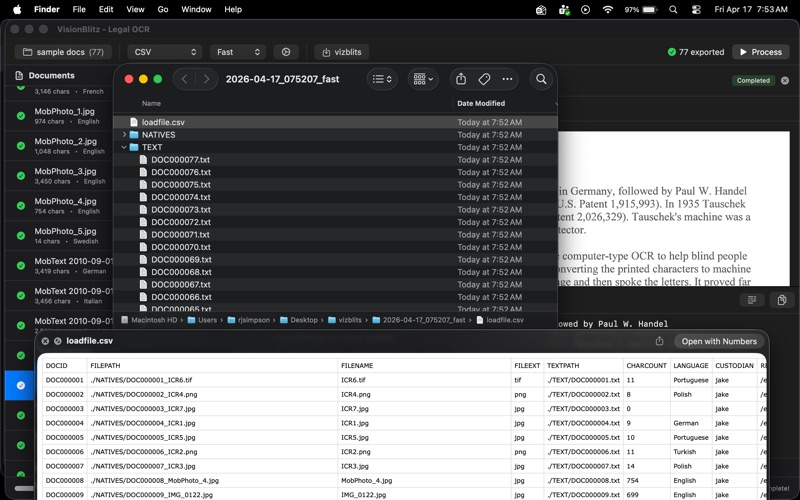
• Export Concordance DAT or CSV loadfiles with standard field names (DOCID, FILEPATH, TEXTPATH, CUSTODIAN)
• Generate Opticon OPT files for image overlays
• Preview any document with zoom, pan, and page-by-page navigation
• Search extracted text with match highlighting
• Drag and drop folders directly onto the window

WHY VISIONBLITZ
Local-only processing. Powered by Apple's Vision framework. No cloud. No telemetry. No account required.

Fast. Uses every CPU core in parallel for batch throughput. Multi-page PDFs process pages concurrently. Equally quick on Apple Silicon and Intel Macs.

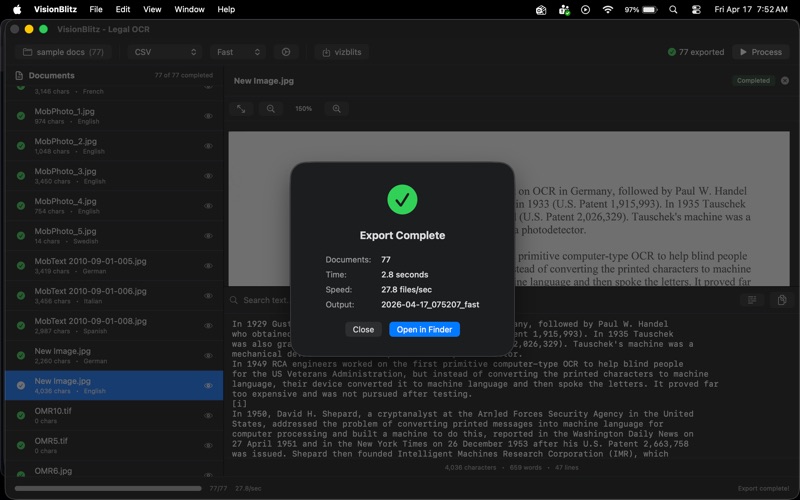
Simple output. Drop a folder, pick a destination, get a timestamped export folder with TEXT and NATIVES directories plus the loadfile.

Predictable naming. DOC000001.txt, DOC000002.txt. Sequential DOCIDs that match Relativity conventions out of the box.

HOW IT WORKS
1. Open VisionBlitz and drag a folder of documents onto the window (or pick one with Cmd-O).
2. Choose your export format: Concordance DAT, CSV, or both.
3. Pick fast or accurate OCR mode.
4. Click Process. Watch live progress with per-document status and a preview panel.

WHAT YOU GET
A clean, timestamped export folder:
  [timestamp]/
    TEXT/           one .txt per document
    NATIVES/        originals with sequential DOCID prefix
    loadfile.dat    Concordance DAT (or loadfile.csv)
    loadfile.opt    optional Opticon overlay

INPUT FORMATS
TIFF, PNG, JPG/JPEG, PDF (multi-page), BMP, GIF, HEIC.

OUTPUT FORMATS
Concordance DAT, CSV, Opticon OPT.

PRIVACY
VisionBlitz is sandboxed. It reads only the folders you explicitly select and writes only to the output folder you choose. It makes no network connections. It collects no analytics. Your documents stay where they belong: on your Mac.

REQUIREMENTS
macOS 13 Ventura or later. Apple Silicon and Intel both supported.

SUPPORT
Questions, bug reports, or feature requests: [email protected]
Release notes, sample files, and docs: getvisionblitz.com