A system monitor for everyone. Whether you just want to keep an eye on CPU usage or you need GPU temperatures, per-core breakdowns, and top processes -- Cmndr puts it all in your menu bar where you can see it at a glance.

Never wonder why your Mac is running hot or your fan is spinning. Five live graphs sit in your menu bar, and a single click opens a detailed panel with everything you need to know.

WHAT YOU CAN MONITOR
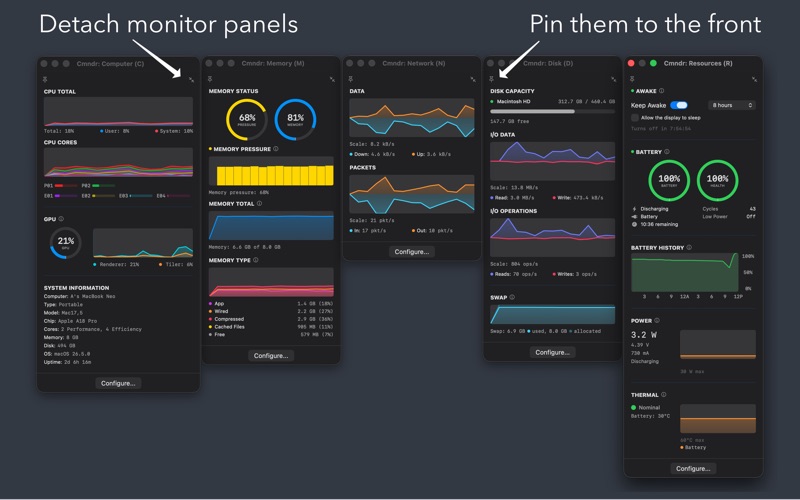
- CPU and GPU -- Total usage, per-core breakdown, GPU renderer and tiler utilization, and top processes eating your CPU
- Memory -- Pressure level, usage by type (app, wired, compressed, cached), and the processes using the most memory
- Network -- Download and upload speeds, packet rates, and your IP addresses (click to copy)
- Disk -- Read/write throughput, I/O operations, capacity per volume, and swap usage
- Battery and Power -- Battery level and health gauges, 24-hour charge history, power draw in watts, and charging status
- Thermal -- CPU and GPU temperatures with history, thermal state indicator so you know when your Mac is throttling
- Keep Awake -- Prevent sleep on demand for 5m through 5h or indefinitely, with an option to let the display sleep while the system stays awake; obeys Apple's safety overrides (lid close, manual sleep, low battery, thermal critical)
- System Info -- Your Mac's name, model, chip, core layout, memory, disk, uptime, and OS version in one place

STAYS OUT OF YOUR WAY
- Lives in the menu bar -- no dock icon, no windows cluttering your desktop
- Click to see details, click away to dismiss
- Detach any panel into a floating window and pin it on top while you work
- Right-click any menu bar item to quickly switch display modes or open Settings
- Compact mode for machines with limited menu bar space

MAKE IT YOURS
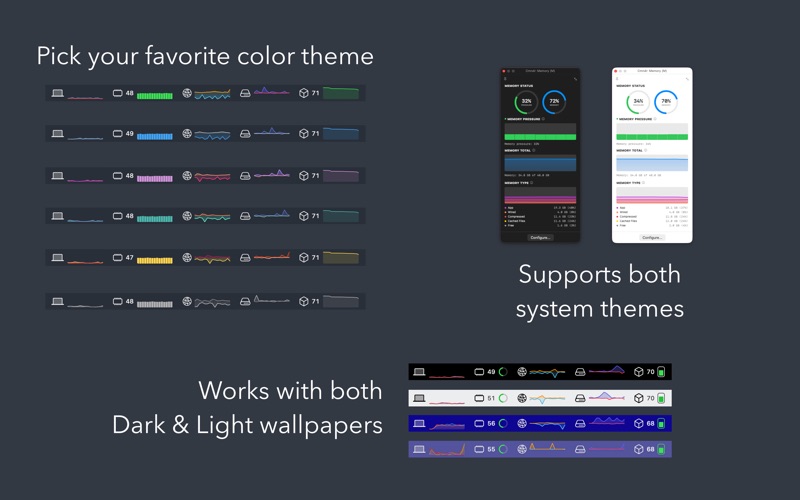
- 7 color themes
- Automatic light and dark mode
- Multiple display modes per monitor -- choose the graph that matters most to you
- Adjust graph widths, toggle sections on or off, set update speed from 0.5s to 8s
- Show or hide inline percentages for CPU, memory pressure, and battery

NATIVE AND PRIVATE
- Built with SwiftUI and AppKit -- no Electron, no web views, no bloat
- Designed for Apple Silicon Macs (M1 and later)
- Fully sandboxed for your security
- Does not transmit or collect your data -- everything stays on your Mac
- Requires macOS Sonoma (14.0) or later