Code goes to AI. Words come to you.

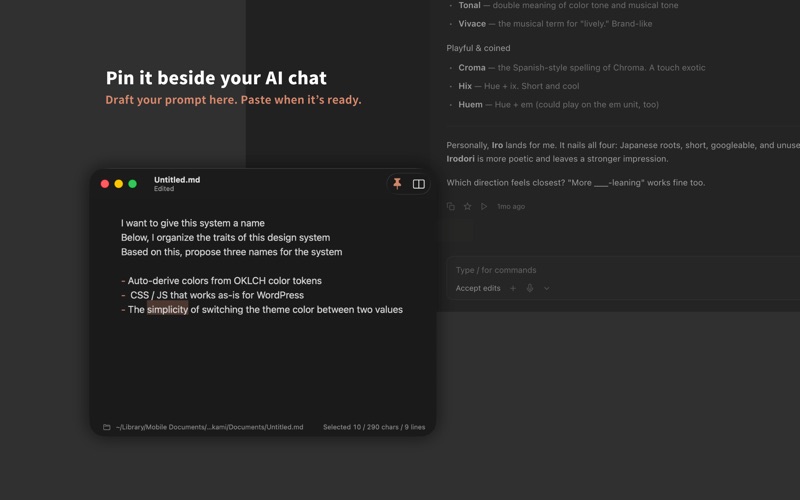
Now that AI handles the coding, what should a text editor for humans look like? Kami is built around that question — a daily-driver editor that keeps only what's needed for the writing humans still do: drafting prompts for AI tools, blog posts, quick notes. Pin it beside your AI chat and keep both in view.


■ Features

[Instant launch, feather-light]
Tuned to launch as fast as Apple's own apps — Apple Silicon native and only a few MB. The moment you want to write, you're already typing. Stays fast even on older or entry-level Macs.

[A native Mac feel]
Nothing new to learn. Menus, shortcuts, and native tabs all behave exactly the way Mac users already expect.

[Pin — Always on Top (⌘⇧P)]
Float Kami above every window and write prompts side-by-side with an AI chat. Pin state is remembered per file.

[Markdown, just as you wrote it]
Handles .md and .txt exactly as they are — never hiding or rewriting symbols, just adding subtle color to headings, code, lists, quotes, and links.

[Markdown Preview (⌘⇧M)]
Split editor and preview and watch the result take shape in real time. The preview follows your editor scroll.

[Color themes]
Kami's original muted-Japanese palette in two variants — Standard and High Contrast — each with light and dark, following your macOS appearance automatically.

[Adjust to taste]
Font (proportional / monospaced), size (11–24pt), line spacing (1.0–2.0), and editor width — all in one simple Settings window. No screen full of options to agonize over.

[Minimal UI]
The footer shows only a character count, line count, and file path — nothing more. Hide it entirely with ⌘/. Select text to see the selection count.

[Open code and config files too]
Drop in a JSON, YAML, XML, SQL, TOML, shell script, .env, Dockerfile, or .gitignore and get syntax highlighting tuned to Kami's color themes, plus automatic line numbers. Ready for quick config edits too.

[⌘Click to Open URLs]
⌘click any URL to open it in your browser. Otherwise it's just text — no distraction.

[Copy All (⌘⇧C)]
Copy the whole document in one step — handy before pasting into an AI chat.

[Nothing to forget to save]
iCloud Drive auto-save and macOS Versions are built in, so your writing is reachable from every Mac.


■ Intentionally omitted

Encoding / line-ending switches, rich text, scripting — not simplified, just not needed for everyday writing in the AI era.


■ Who it's for

· You want a fast, truly minimal text editor
· You want to preview Markdown rendered by AI
· You write Markdown casually
· You want to quickly edit config files


Free to use.
Requires macOS 14 Sonoma or later. Apple Silicon Mac.