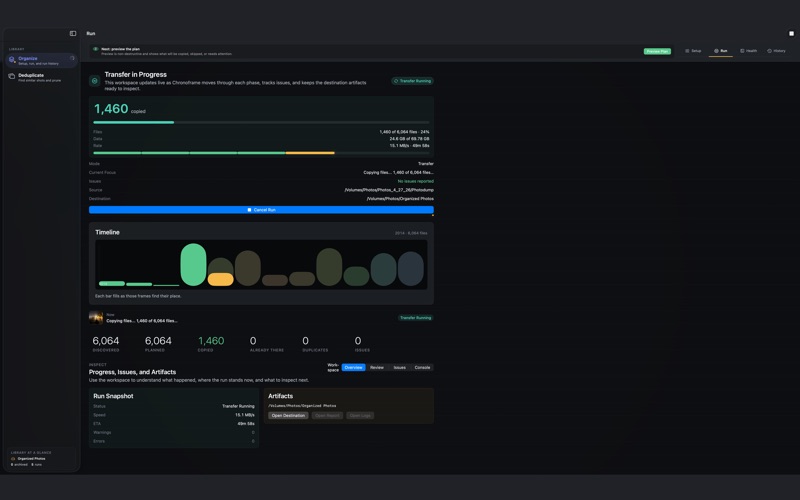
Chronoframe is a safe photo and video organizer for people with years of media spread across phones, camera cards, old laptops, external drives, and backup folders
Chronoframe is a safe photo and video organizer for people with years of media spread across phones, camera cards, old laptops, external drives, and backup folders. It builds a cleaner library in two practical ways and it always shows you a plan before it changes anything.

ORGANIZE
Point Chronoframe at a messy folder and a destination, pick a date-based layout, and preview the plan. Chronoframe resolves each file's date from photo metadata, filename patterns, and the filesystem, and lets you review or correct uncertain dates before a single file is copied. Your source folder is read-only, nothing is moved, renamed, edited, or deleted.

DEDUPLICATE
Find exact copies by content, not filename, plus near-duplicates, burst groups, RAW+JPEG pairs, and Live Photo pairs. You decide what to keep. Selected files move to the macOS Trash, never a permanent delete, so you can always recover them.

SAFE BY DESIGN
• Originals stay untouched: Chronoframe only reads your source folder.
• You approve the plan: Organize previews what will copy; Deduplicate previews what moves to Trash.
• No overwrites: filename collisions get a distinct name instead of replacing a file.
• Copies are verified: transfers are written atomically and re-hashed by default.
• Receipts and undo: History records each run, and supported runs can be undone when files still match the receipt.

PRIVATE
Chronoframe works only on folders you choose, processes everything on-device, and never uploads your library. There is no account, no analytics, no advertising, and no tracking. Cache, log, and receipt files are written inside the destination folder you select, so you can inspect or remove them anytime.

REQUIREMENTS
macOS 13.0 or later. Apple Silicon and Intel. Works fully offline.