



Description
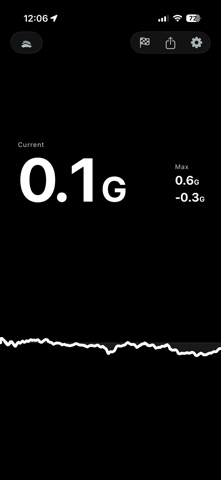
Pull turns your iPhone into a live longitudinal g-force meter for driving — every push into your seat and every dive into the belt, traced the instant it happens
Pull turns your iPhone into a live longitudinal g-force meter for driving — every push into your seat and every dive into the belt, traced the instant it happens. New in 1.3: Runs quietly catches every launch and roll while you drive, so a quarter-mile just gets banked without ever tapping a stopwatch.

FEATURES
• Live G-force readings for acceleration and braking
• Real-time scrolling telemetry chart with drag-to-explore review
• Peak acceleration and braking captured on every drive
• Runs — set a roll or launch from a stop, floor it, and Pull banks your 60-foot, 0–60, and quarter-mile automatically. No button, no countdown
• History — every banked run files itself in a logbook you never wrote
• Records — your personal bests across every measure, one trophy shelf
• Garage — add your cars, and every run is stamped with the one you set it in. Each car remembers its own dash color
• Share any peak, whole ride, or banked run as a clean card
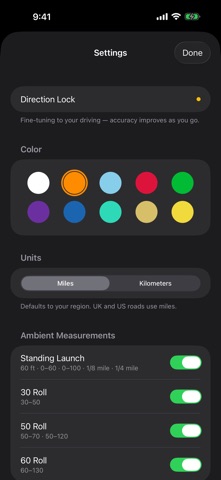
• Ten dashboard tints — pick what reads cleanest against your dash
• Follows your region for miles or kilometres — flip whenever you like
• Automatic setup — no calibration step; it learns your direction of travel as you drive
• Works in any mount or orientation — dashboard, vent, or a flat console charger

HOW IT WORKS
Pull uses your iPhone's motion sensors and your direction of travel to measure longitudinal acceleration accurately. It works the moment you start moving and sharpens within seconds — no calibration step and no fixed mounting position.

While you drive, Runs watches quietly in the background. Set a roll or come to a stop and launch, and Pull times it against your true from-crossing — no stopwatch to tap, no countdown to fumble. You decide it was a run after the run. Ordinary driving stays silent.

Location is used only to sense the direction of travel. It's processed entirely on your device and never leaves it.

Place your phone in any mount — dashboard, vent, or a flat charging pad — open Pull, and drive.

GREAT FOR
• Enthusiasts who want their 60-foot, 0–60, and quarter-mile without fuss
• Drivers working on smoother acceleration and braking habits
• Exploring how a car pulls, brakes, and settles across a drive
• Anyone who's ever wished the pull they just made had been timed

PRIVACY
Your measurements, location, and drive data stay on your device and are never uploaded to the cloud. Pull does not collect, store, or share your personal data.

No account. No signup. No internet connection required.

QUICK START
1. Place your iPhone in any mount in your vehicle
2. Open Pull and allow Location access
3. Drive and watch live acceleration data update in real time
4. Review your session history and telemetry afterward

IMPORTANT
Pull measures longitudinal acceleration only (forward and backward motion). Always drive responsibly and obey local traffic laws. Never operate the app in a way that distracts from safe driving.
