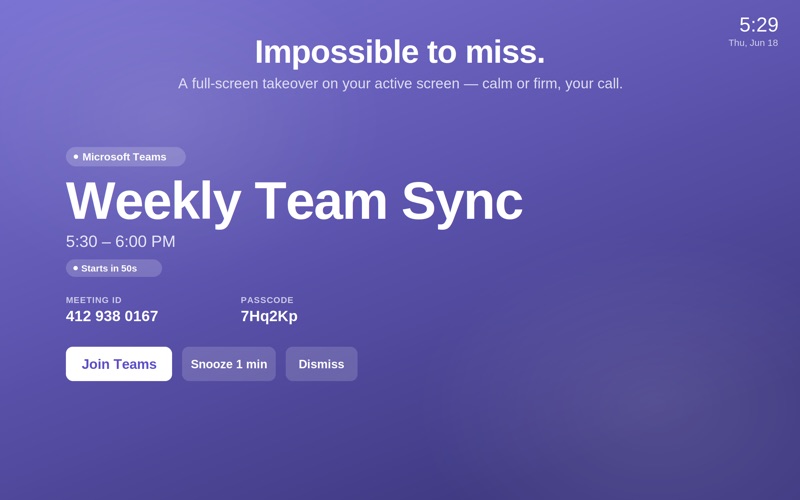
Your next meeting shouldn't have to beg for your attention.

Summon throws a hard-to-ignore full-screen alert on the exact screen you are working on, with your join link already detected and one button to get in.

Free to download. No nags, no timers, no locked alerts.

THE ALERT THAT ACTUALLY INTERRUPTS

When a meeting is about to start, Summon takes over your active screen, shows the meeting title, and puts a single Join button front and center. Zoom, Google Meet, and Microsoft Teams links are detected automatically from your event URL, location, and notes. One tap and you are in.

ON THE RIGHT SCREEN, EVERY TIME

Every other meeting alert app gets multi-monitor wrong. The alert fires on the screen you are not looking at, and you miss the meeting anyway.

Summon resolves this at fire time: the alert appears on the screen with your keyboard focus, falling back to the screen under your cursor, then your main display. Plug in a second monitor, unplug it, rearrange your windows. The alert will still find you.

PAUSE FOR THE PRESENTATION. RESUME AUTOMATICALLY.

Presenting or screen-sharing? Pause Summon for 15, 30, or 45 minutes and it auto-resumes at the exact wall-clock time. The menu bar shows you when alerts are coming back. No other meeting alert app ships this. You will never forget to re-enable alerts after a demo again.

YOUR CALENDAR NEVER LEAVES YOUR MAC

Summon reads your calendar through Apple EventKit entirely on-device. Zero outbound network connections. The release build deliberately omits the network entitlement, so no socket can open. Your schedule, your meetings, your attendees: none of it is transmitted. This is a verifiable promise, not a privacy policy paragraph.

Features:

- Full-screen alert on your active screen at your chosen lead time (1, 2, or 5 minutes before)
- One-click join with auto-detected Zoom, Google Meet, Microsoft Teams, FaceTime, WhatsApp and many more links
- Menu-bar next-meeting glance with quick join, no need to wait for the alert
- Timed pause with auto-resume (15, 30, 45 min presets)
- Event notes shown read-only on the alert, so you have the dial-in code at the moment you need it
- Zero network connections for every core function

For people with multi-monitor rigs or who want to make the alert their own:

- Multi-display alerts: the full-screen takeover mirrors to every connected monitor simultaneously, so the alert is inescapable no matter which screen you glance at
- Alert style customization: choose the full-screen treatment that fits your workflow and focus style

SUMMON PRO, ONE-TIME

Unlimited alerts (vs 10 for FREE). One-time purchase. No subscription. Restore on any Mac with your Apple ID.

Heads-down in code or design across two monitors and banner notifications bounce right off your focus state? This is the alert that breaks through.

Presenting in chunks of the day and dreading an alert detonating mid-demo? Timed pause was built for exactly that.

Experience time blindness or hyperfocus where standard notifications disappear entirely? A full-screen takeover is the intervention that works.

macOS 14 or later required.