




Description
Everything Clipboard keeps a searchable local history of what you copy on your Mac, so useful text, links, colors, files, and pasteboard content are easy to find again
Everything Clipboard keeps a searchable local history of what you copy on your Mac, so useful text, links, colors, files, and pasteboard content are easy to find again.

Instead of losing each copied item when the next one replaces it, browse your history by pasteboard, content type, source app, or search. It is built for writing, research, support, development, design notes, and any workflow where you copy more than one thing at a time.

Key features:

- Use the first-run setup assistant to choose capture, interface, and privacy defaults.
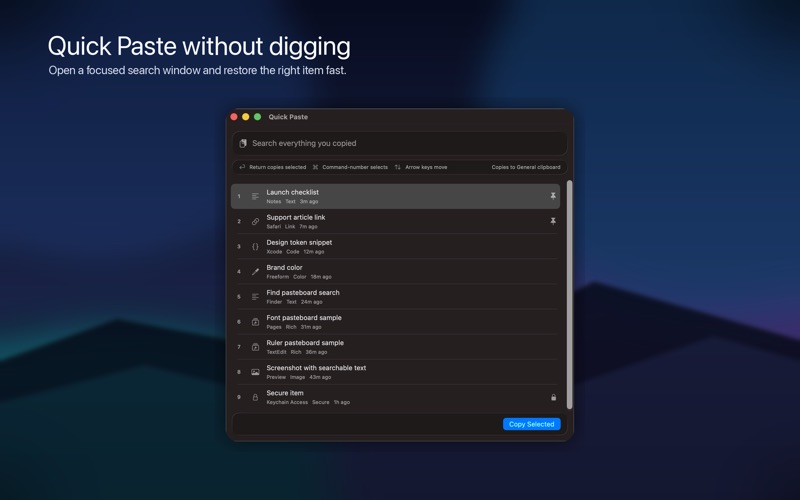
- Search your clipboard history from a full app window or the fast Quick Paste window.
- Use Command-number shortcuts in Quick Paste for the first ten visible results.
- Monitor the standard General pasteboard, plus macOS Find, Font, and Ruler pasteboards, and label nearby-device copy events as Universal Clipboard items.
- Browse by content category, including text, links, code, colors, images, video, audio, files, rich content, pinned items, and secure items.
- Pin important copied items so they stay easy to find.
- Copy an older item back to the General clipboard, then paste normally in any Mac app.
- Remove exact duplicate history items while keeping one useful copy, with pinned items preferred when possible.
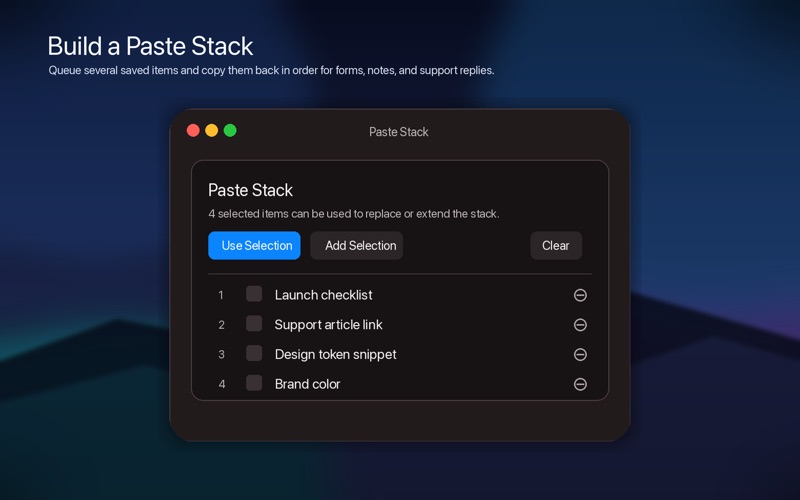
- Build and reorder a Paste Stack when you need several saved items in sequence.
- Create Personal Notes that are stored separately from clipboard history until you choose to add them.
- Share notes and non-secure text-backed clipboard items with the native macOS share picker.
- Clean copied text, clean tracking links, create Markdown links, format JSON, recognize searchable text in copied images, and open the first detected link in a browser.
- Choose how long history is kept and how many items are stored.
- Get a warning before older unpinned items are cleaned up automatically.
- Pause monitoring for 5, 10, 15, 20, or 30 minutes, until an exact time, or until resumed.
- Ignore specific apps or text patterns, including password managers, terminals, secrets, tokens, and private-key-looking text.
- Protect secure-looking copied text behind macOS authentication before reveal.
- Export and import passphrase-protected local history archives for backup or migration.

Everything Clipboard is local-first. Your clipboard history is stored on your Mac, and the app gives you controls for what is captured, what is ignored, and when history is removed.

Privacy and control:

Clipboard history can contain sensitive information, so Everything Clipboard includes practical capture controls. Use the setup assistant, pause monitoring, choose watched pasteboards, ignore apps or text patterns, and require macOS authentication before revealing secure-looking text.

Quick Paste:

Open Quick Paste when you want a keyboard-first way to find something you copied earlier. Search recent items, use arrow keys or Command-number shortcuts to move through results, and copy the selected item back to the General clipboard.

Paste Stack:

Paste Stack helps when one copied item is not enough. Select saved items, add them to the stack, then copy each one in sequence for normal paste.

Personal Notes:

Save reusable text in Personal Notes without changing any clipboard. When a note is ready, add it to General, Find, Font, or Ruler, or share it through the native macOS share sheet.

Encrypted history archives:

Export a passphrase-protected archive when you want a local backup or migration copy. Secure item reveal text remains protected in Keychain and is not included in exported archives.

Designed for Mac:

Everything Clipboard uses native macOS windows, toolbars, menus, settings, and Help. The toolbar can be customized from the View menu or by right-clicking the toolbar, and the sidebar sections can collapse when you want more room. It fits into regular desktop workflows while keeping detailed clipboard tools close at hand.
