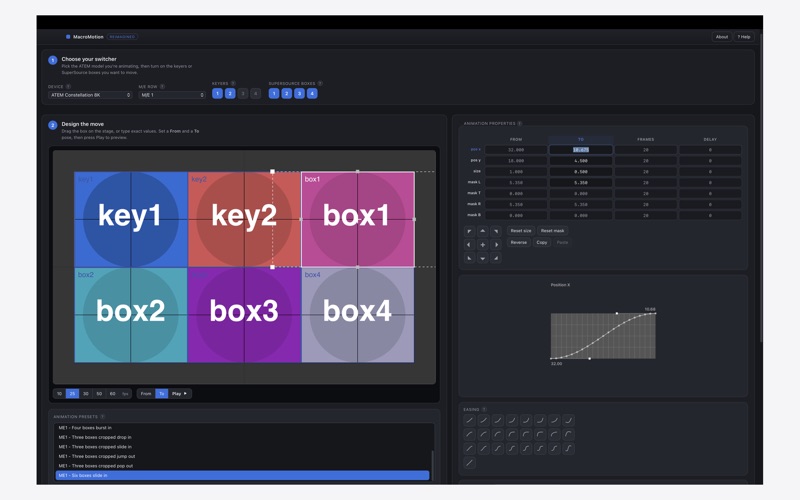
MacroMotion makes it easy to design smooth, professional picture-in-picture animations for Blackmagic ATEM switchers - and export them as macros you can run on the hardware
MacroMotion makes it easy to design smooth, professional picture-in-picture animations for Blackmagic ATEM switchers - and export them as macros you can run on the hardware.

Build a move in three simple steps:
1. Choose your switcher and switch on the keyers or SuperSource boxes you want to animate.
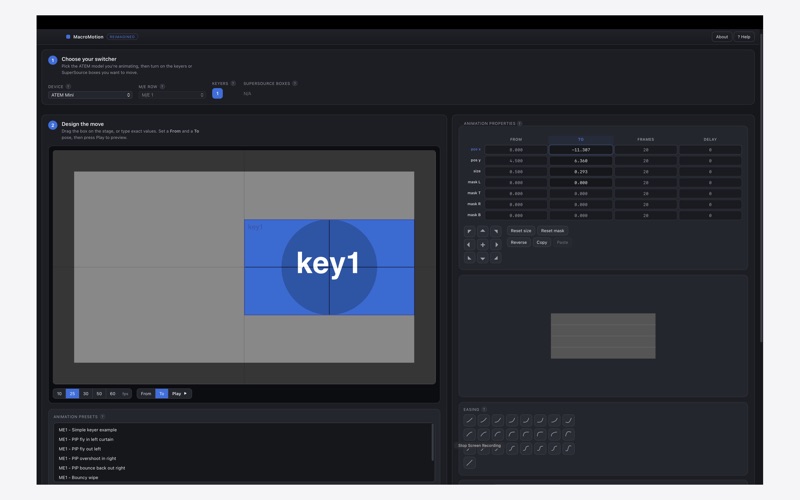
2. Design the motion - drag the box on stage or type exact values, set a "From" and "To" pose, choose an easing curve, and press Play to preview.
3. Save it as an ATEM macro and restore it in ATEM Software Control.

FEATURES
- Two-keyframe DVE and SuperSource animations - flies, zooms, reveals and more
- A library of ready-made animation presets to start from
- Smooth easing curves (ease in/out, bounce, back and more) for natural motion
- Works across the ATEM range, from ATEM Mini to Constellation
- Precise frame and delay control with live preview
- Tailored to your exact model's keyers, SuperSource boxes and M/E rows
- 25 / 50 fps (PAL) and 30 / 60 fps (NTSC)
- Native macOS app - fast, fully offline, no account required

Design your animation, save the macro file, then load it in ATEM Software Control > Macros > Restore. Your macros then run on the switcher itself, with no computer attached.

MacroMotion is an independent tool. "ATEM" and "Blackmagic" are trademarks of Blackmagic Design; MacroMotion is not affiliated with, or endorsed by, Blackmagic Design.