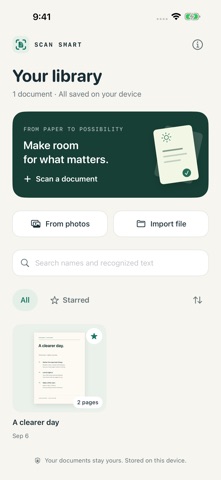
Scan Smart gives your paperwork a place to stay. Capture receipts, notes, letters, and multi-page documents, keep them in a private library, and find what you need when you need it.

CAPTURE AND IMPORT
Scan with automatic edge detection and perspective correction using the document camera. Import selected photos, image files, or PDFs, with up to 50 pages in each document.

MAKE EVERY PAGE CLEAR
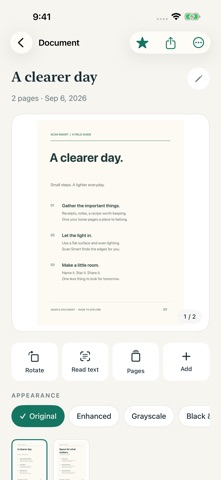
Review and zoom into pages, rotate them, and choose Original, Enhanced, Grayscale, or Black & White. Reorder or remove pages, append new scans, and rename your documents.

FIND THE WORDS
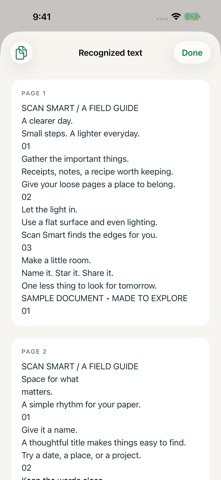
Use Read text to recognize text on your device. Copy recognized text or search for it from your library, alongside document names. Recognition accuracy depends on the language and quality of the page, so check important details.

KEEP THINGS ORGANIZED
Your library saves automatically. Star important documents and sort by recently updated, name, or oldest first. An adaptive interface supports iPhone and iPad, light and dark appearances, and larger text sizes.

SHARE A PDF
Export your document as a PDF with its current page order, rotation, appearance, and page proportions. Save a copy to Files or share through the system share sheet.

PRIVATE BY DESIGN
No account, advertising, analytics, or in-app purchases. Scanning, image processing, and text recognition happen on your device. Documents stay in the app and may be included in device backups; sharing is your choice. Export important documents separately because deleting the app also removes its library.

PDF imports become page images and do not preserve original forms, links, or selectable text. Exported PDFs contain page images; recognized text can be searched and copied in the app and is not embedded as a selectable PDF text layer. Camera scanning requires a supported device. Requires iOS 17 or later.