PDF To Word – Doc Converter | PDF & File Tools
Easily convert PDFs to Word and manage all your documents in one app
PDF To Word – Doc Converter | PDF & File Tools

Easily convert PDFs to Word and manage all your documents in one app!

Whether you’re a student, professional, or freelancer, PDF To Word – Doc Converter makes working with PDFs fast, easy, and secure. Convert, compress, merge, split, and edit files — all from one simple app.

Key Features:
• PDF to Word Converter:
Instantly convert PDF files to editable Word documents (DOC/DOCX).

• Convert PDFs with Ease
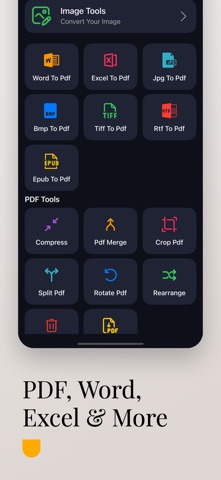
Convert PDF to Word, Excel, PowerPoint, RTF, EPUB, JPG, PNG — and vice versa.

• Office & Image to PDF
Create high-quality PDFs from Word, Excel, JPG, PNG, and more in just one tap.

• Smart PDF Compressor
Shrink PDF and image file sizes without quality loss — perfect for sharing or storage.

• Merge & Split PDFs
Easily combine multiple PDF files or split one into several documents.

• Built-in Image Tools
Crop, resize, rotate, and convert images directly inside the app.

• Offline & Secure Processing
Convert and compress your files privately, with optional offline tools for maximum security.

• No Watermarks
Get professional results every time.

Who Should Use This App?
• Students
• Professionals
• Freelancers
• Office teams
• Anyone working with digital documents

Why Choose PDF To Word – Doc Converter?
• Fast & accurate results
• Simple, clean interface
• Secure offline mode
• Regular updates & improvements
• No watermarks on output files

PDF To Word – Doc Converter offers an auto-renewing weekly, monthly and one time purchase subscription. Payment will be charged to your iTunes Account on confirmation of purchase. Your subscription will automatically renew unless auto-renew is turned off at least 24 hours prior to the end of the current period. You may manage your subscriptions and turn off auto-renewal in your iTunes Account Settings after purchase. Any unused portion of free trail period, if offered, will be forfeited when you purchase a subscription, where applicable.

PDF converter, PDF compressor, merge PDF, split PDF, PDF editor, DOC converter.

Privacy Policy: https://sites.google.com/view/developer-planet/privacy-policy
Terms of use: https://sites.google.com/view/developer-planet/terms-of-use

Download PDF To Word – Doc Converter now and take control of your documents — all in one app.