Chroni is a time tracker for freelancers, consultants and contractors who bill by the hour
Chroni is a time tracker for freelancers, consultants and contractors who bill by the hour.

Start a timer when you begin work. Stop it when you finish. At the end of the month, turn those tracked hours into an invoice you can send to a client.

START, STOP, ADJUST

Tap start and Chroni keeps timing, even if you background the app, force quit it, or restart your phone. Only the moment you started is stored, so the elapsed time is always right.

Forgot to press start? Move the start time while the timer is still running, and the count catches up. Stopped late because the meeting ran on? The new entry appears with an Adjust button on it, so you can correct the end time on the spot.

Work rarely begins and ends on a round number, so Chroni lets you set the exact times rather than rounding for you.

ON YOUR LOCK SCREEN

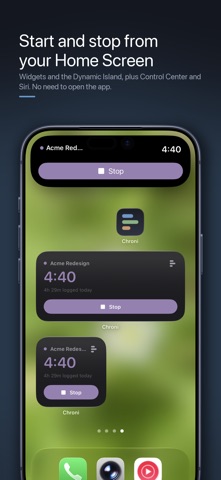
A Live Activity keeps the running timer on your Lock Screen and in the Dynamic Island. Home Screen and Lock Screen widgets show what is running and let you stop it without opening the app. A Control Center button does the same from anywhere.

When no timer is running, the widget shows how long you have worked today and offers one tap to start the last project again.

ASK SIRI

Say "Stop my Chroni timer" or "What am I tracking in Chroni?". The phrases work as soon as you install the app, with no setup. Every action is also a Shortcuts action, so you can start a timer from a Focus mode, an NFC tag, a location or a time of day.

BILL FOR YOUR TIME

Set an hourly rate for each project, or one default rate for everything. Mark work as billable or not. Group projects under the client you send the bill to. Round each entry up to the six, fifteen or thirty minute increments you bill in.

Then create an invoice: line items with the date, a note, hours, rate and amount, with a total at the bottom. You read it inside Chroni before you send it anywhere.

SEE WHERE YOUR TIME WENT

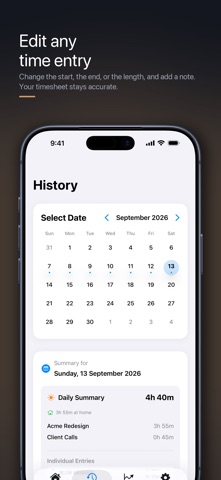
Charts by day and by project. Billable hours and what they are worth. A month calendar showing which days you tracked, and every entry can be edited afterwards, so your timesheet stays accurate.

WORKED FROM HOME?

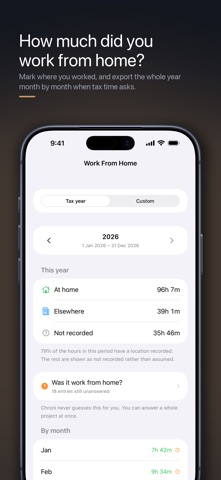
Mark where you worked, once per project or entry by entry, and export the tax year — or any date range — as a month-by-month PDF or CSV report when somebody asks. Entries you never answered are reported as not recorded, not guessed.

YOUR DATA STAYS YOURS

No account and no sign-up. Everything is stored on your iPhone and syncs through your own iCloud if you turn that on. No analytics, no ads, no tracking.

CSV export is free and always will be, so you can take your hours somewhere else whenever you like.

WHAT IS FREE, AND WHAT IS PAID

Free: unlimited projects, the timer, Live Activities, widgets, Siri and Shortcuts, analytics, recording where you worked, PDF reports, and CSV import and export.

Chroni Pro adds hourly rates, billable tracking, clients, billing increments, invoices and the year-end work-from-home report. $14.99 a year with the first week free, $2.99 a month, or $29.99 once and it is yours for good.

A year of Chroni Pro costs less than fifteen minutes of most freelance work.

Terms of Use (EULA): https://www.apple.com/legal/internet-services/itunes/dev/stdeula/
Privacy Policy: https://aziosapps.com/chroni/privacy.html