Demolish the tyranny of too much choice, say "NO" to BigAlgo, and just Relax with Coax
Demolish the tyranny of too much choice, say "NO" to BigAlgo, and just Relax with Coax.

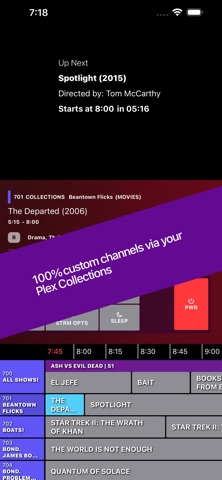
Within seconds, you'll be flipping through a schedule made entirely of your own home media server content. Jump right in with the on-screen cable guide and watch whatever's on, just like the old days.

You can't pause, you can't skip forward, you can't rewind - all you can do is change the channel. Experience the joy of randomly happening upon a great scene in a movie you forgot you had, or a TV show marathon for an old favorite.

Coax requires no setup at all - it uses the metadata your media library already has. If you want, you can create your own custom Lineups, with all sorts of simple yet powerful scheduling rules - create a Saturday Morning Cartoons Lineup for your inner (or actual) child, or a Late Night Thrillers Lineup for date night.

Important: This app requires a Plex account and access to a Plex Media Server (or Jellyfin, or Emby). Coax does not provide or distribute any media; it only connects to content you already own.

How to configure your Lineups:

	•	Coax scans your home media libraries and generates a channel guide based on your content’s metadata.
	•	Select which channel categories you want: Genre, Decade, Recent Additions, Actor, Studio, Director, and Collections.
	•	Create 100% custom channels using Collections.
	•	Unify your libraries to mix TV and movie channels.
	•	Adjust the number of channels you want to generate.
        •       Customize the time between your programs with Gap Content - play Trailers, or content from another Library if you want!

Coax is your personal “cable box” for your own content — no extra accounts, no third-party streaming, just your Plex library organized in a fun, nostalgic way.

https://www.apple.com/legal/internet-services/itunes/dev/stdeula/