No expensive headset. No trip to the theater.
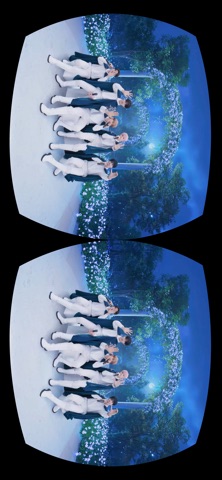
With just a VR Concert Box and your smartphone,
TOMORROW X TOGETHER's stage unfolds right before your eyes, 0cm away.

Uninterrupted eye contact, a dream concert where they look only at you, from start to finish!
Download now and experience the sensational VR concert that electrified 22 cities worldwide, anytime, anywhere!


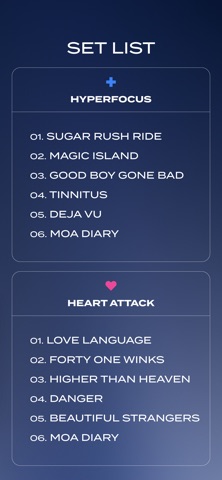
[TOMORROW X TOGETHER VR CONCERT LINEUP]
● HYPERFOCUS : TOMORROW X TOGETHER VR CONCERT
● TOMORROW X TOGETHER VR CONCERT : HEART ATTACK
Each concert can be viewed with your purchased VR Concert Box.
If you've purchased both boxes, you can enjoy both concerts with a single account.


[How to Use Your VR Concert Box]

1. Prepare Your VR Concert Box
Check the smartphone slot on your VR Concert Box.

2. VR Concert Box App Installation & Account Registration
Sign up easily with your email, phone number, or social media account.

3. QR Code Registration
Scan the QR code included with your VR Concert Box using the app.

4. Download the TOMORROW X TOGETHER Concert
Download once and watch again anytime, anywhere.
We recommend downloading over Wi-Fi.

5. Insert Your Smartphone & Start Watching
Place your smartphone into the VR Concert Box, hold it up to your eyes, and the show begins.
If the screen appears off-center, look straight ahead and double-tap to realign.

● Screen recording and screenshots are disabled during playback to protect artist content.
● An internet connection is required during playback.
● Each QR code can only be registered to one account.
● Each VR Concert Box only grants access to the concert it was purchased for.


[Optional Permissions]
● Camera: To scan QR codes
● Notifications: To receive concert updates
● Storage: To download concert content

You may use the service without granting Optional Permissions.

Support: [email protected]
Privacy Policy: https://www.amazevr.com/privacy-notice
Terms of Service: https://www.amazevr.com/terms-and-conditions