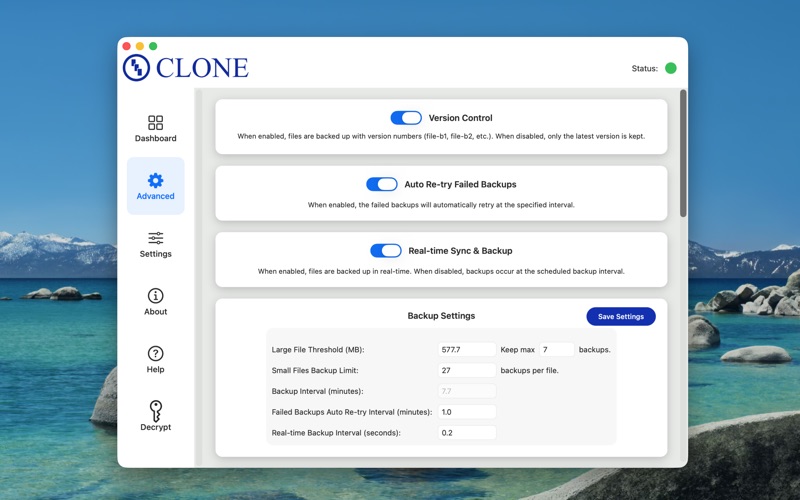
Never lose a file again. CLONE protects your data with intelligent, real-time backup to local drives, external drives, USB drives, network storage, or cloud services (iCloud Drive, Dropbox, Google Drive, OneDrive).

SMART & EFFICIENT
	•	Hash-based comparison backs up only changed files
	•	Real-time monitoring syncs files the moment they change
	•	Handles terabytes of data efficiently
	•	Works with any mounted Mac volume

POWERFUL ENCRYPTION
	•	Optional AES-256 encryption with password protection
	•	Built-in decryption tool
	•	Secure your sensitive data during backup

VERSION CONTROL
	•	Keep multiple versions of your files
	•	Custom limits for small vs. large files
	•	Automatic old version cleanup
	•	Never lose track of file changes

FLEXIBLE & RELIABLE
	•	Multiple sources to multiple destinations simultaneously
	•	Priority-based backup queues
	•	Auto-retry on drive/network failures
	•	Graceful handling of disconnected drives
	•	Circular reference protection

CUSTOMIZATION
	•	Extension-specific backup rules
	•	Ignore unwanted file types (by name, prefix, suffix, or directory)
	•	Custom large file thresholds
	•	Configurable backup intervals
	•	Launch automatically at login

VISUAL PROGRESS
	•	Live progress circles show status at a glance
	•	Real-time file list with per-file status
	•	Menu bar icon with critical alert badges
	•	Complete backup history
	•	Failed backup tracking with automatic/manual retry

SECURITY
	•	Lock/unlock app with TouchID (finger print) or password
	•	SHA-256 integrity verification
	•	Encryption password protection

FOR EVERYONE
        •	Beginners: Pick folders, click backup, done.
        •	Business: Protect critical data with automated retries and notifications.
        •	Professionals: Advanced controls for version limits, hash comparison, and detailed monitoring.

MODERN INTERFACE
	•	Clean, native macOS design
	•	Dark mode support
	•	Resizable elements
	•	Drive type detection with smart icons
	•	Easy-to-read help documentation

Make CLONE your trusted macOS backup solution. Your files, digitally immortal.