PlanWell for iOS is a companion app for viewing your daily teaching schedule on the go
PlanWell for iOS is a companion app for viewing your daily teaching schedule on the go.

IMPORTANT: This app is designed to work alongside the free PlanWell web app (app.planwellmd.com) or desktop app. It provides quick, read-only access to your current day's schedule. For planning, editing, and managing your classes, use the free web or desktop version.

The $4.99 price supports ongoing iOS development. Free lifetime updates included.

WHAT THIS APP DOES

• View today's schedule at a glance
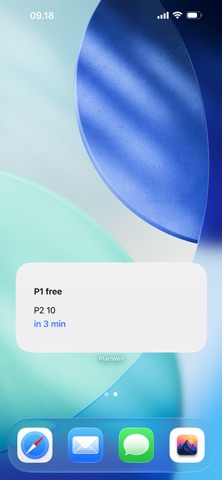
• Home screen widget showing current and next class
• Quick access to class notes and details
• Works with your existing PlanWell markdown vault
• Syncs via iCloud Drive with web/desktop apps

WHAT THIS APP DOESN'T DO

This is a companion viewing app, not a full planning tool:
• No editing or creating classes (use web/desktop app)
• No term planning (use web/desktop app)
• No schedule configuration (use web/desktop app)
• Shows today's schedule only

RECOMMENDED SETUP

1. Use the FREE web app at app.planwellmd.com or download the FREE macOS app
2. Create your schedule, classes, and lesson plans there
3. Store your vault in iCloud Drive for automatic sync
4. Install this iOS app to view your schedule on iPhone
5. Add the widget to your home screen for quick glances

WHY iOS + WEB/DESKTOP?

• Web/Desktop: Full planning, editing, term view, markdown editing
• iOS: Quick daily view, widget, on-the-go access to notes
• Together: Complete teacher planning solution

HOW IT WORKS

1. Create your schedule using app.planwellmd.com (free)
2. Save your vault to iCloud Drive
3. Open this iOS app and point it to the same iCloud folder
4. View today's schedule instantly
5. Add widget to home screen

YOUR DATA STAYS YOURS

All data stored as markdown files in iCloud Drive:
• Edit in PlanWell web/desktop apps
• OR edit directly in Obsidian, VS Code, any text editor
• Your files, your control
• No vendor lock-in

MARKDOWN-FIRST DESIGN

Every class is a plain markdown file with YAML frontmatter:

---
title: Mathematics
period: 2
occurrences:
  - day: Monday
    period: 2
  - day: Wednesday
    period: 2
---

# Unit 1: Algebra Basics
...

HOME SCREEN WIDGET

See your current class without opening the app:
- Current class in progress (e.g., "P2 Math")
- Next class and time remaining (e.g., "P5 Music in 68 min")
- "not started" before school, "done" after school

PERFECT FOR

• Teachers already using PlanWell web/desktop
• Educators who want mobile access to their schedule
• Teachers who use Obsidian for note-taking
• Privacy-conscious educators
• Anyone who values data ownership

PRIVACY BY DESIGN

• No account required
• No cloud service (just iCloud Drive)
• No data collection
• No analytics or tracking
• All data stays in your iCloud Drive

FREE COMPANION APPS

• Web app: app.planwellmd.com (Chrome/Edge - FREE)
• macOS app: planwellmd.com (Apple silicon - FREE)
• All versions use the same markdown format

REQUIREMENTS

• iOS 17.0 or later
• iPhone or iPad
• FREE PlanWell web or desktop app for full planning
• iCloud Drive (recommended for sync)
• Markdown vault with schedule data

GETTING STARTED

1. Visit app.planwellmd.com (free) to create your schedule
2. Save vault to iCloud Drive
3. Download this iOS app
4. Point app to your iCloud vault folder
5. View today's schedule!

SUPPORT

Questions? Email [email protected]
Tutorials: youtube.com/@PlanWell_app
Website: planwellmd.com