Shuttery is a culling app for photographers — the first pass through your photos after a shoot
Shuttery is a culling app for photographers — the first pass through your photos after a shoot. Open a folder or a card, fly through thousands of frames with the arrow keys, mark them with colors and stars — and the ratings land in XMP sidecar files next to your photos. No catalog, no import, no cloud.

NEW IN 2.0: TWO LOOKS TO CHOOSE FROM
A modern look built from native macOS elements — a system window bar, a calm muted interface where your own photo labels stand out first. Plus a light, dark or follow-the-system theme. The classic look is unchanged. Switch in Appearance settings, instantly, with no restart — your open folder, selection and ratings stay put.

ONE-TAP CULLING
The Q key works like Photo Mechanic — one press sets red, another clears it. No more thinking "1, 2, 3" — just "keeper or not". The M and Shift+M keys move or copy a photo to a chosen folder with a single keystroke, XMP sidecar included. After a move you stay on the next photo.

NAVIGATION WITHOUT WAITING
Hold an arrow key and the image keeps up — Shuttery draws it through the GPU, while the metadata catches up after you release the key. In 2.0 RAW thumbnails are built several times faster, so a full card is on screen right after you open the folder. A two-level cache (RAM + disk) means the grid never rebuilds from scratch after a restart.

100% ZOOM
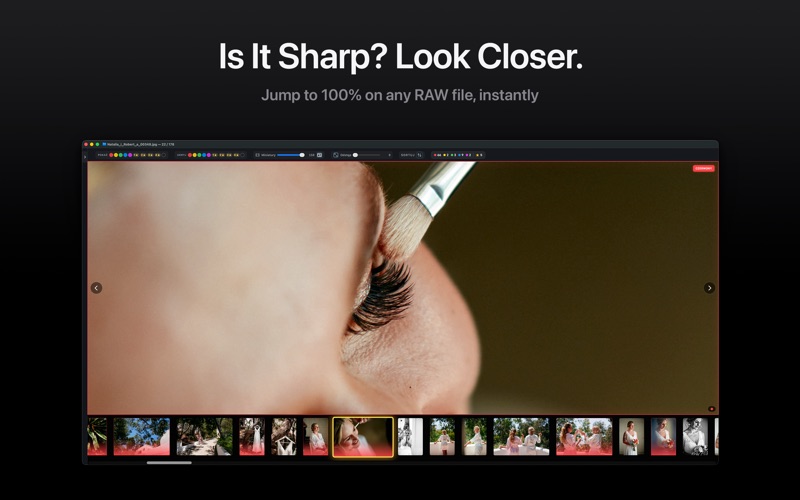
Press Z or double-click to view the photo at full sensor resolution — perfect for checking sharpness. Zoom level and position are preserved across images, so you compare the same eye through a whole series. For RAW files, generate 1:1 previews once and 100% zoom is instant.

RATING YOUR PHOTOS
Color labels (1-5) and stars (6-9) written to XMP sidecars compatible with Adobe Lightroom, Capture One and Photo Mechanic. The rating shows right on the thumbnail, in the grid and in the filmstrip. The screen refreshes instantly while the write happens in the background. Undo up to 50 steps (Cmd+Z). Select hundreds of photos and apply a color in bulk.

GRID AND LIST
A unified grid shows folders and photos together — exactly like the Finder. There is a list view too, with columns for name, type, size, dimensions, date and rating. Non-RAW files get a format badge, so you see at a glance what came off a phone.

INFO PANEL WITH EXIF
Camera, lens, ISO, aperture, shutter, focal length, date and file size. The panel works in the grid too, so you check a frame's settings without opening it.

FILMSTRIP
A thumbnail strip under the main photo scrolls in step with your navigation. Cmd/Shift-click selects several photos at once — the large photo stays put, just like in Lightroom.

SECOND SCREEN
A separate window previewing the current photo. Grid on the laptop, the big frame on an external display.

SIDEBAR
A folder tree with favorites, locations and drives. It remembers expanded folders and the scroll position. Open a photo from the Finder and the sidebar centers its folder for you.

FULL SCREEN
Focus hides everything but the frame — the bars come back when you move the mouse to the edge. In the classic look, Tab also switches between Culling (just the photo) and Browsing (sidebar, grid, panels).

MAKE IT YOURS
Over 60 keyboard shortcuts you can remap, with conflict detection. Build the toolbar from modules by dragging. Nine workspace background shades (B). Move your shortcuts, colors and settings to another Mac.

RAW SUPPORT
Sony ARW, Canon CR2 and CR3, Nikon NEF and NRW, Adobe DNG, Fujifilm RAF, Olympus ORF, Panasonic RW2, Pentax PEF and Samsung SRW. Plus JPG, PNG, HEIC, TIFF, WebP.

LOCAL, NO AI
Everything is computed on your Mac — no photo ever leaves the computer. The network is only needed to verify your subscription and to send a problem report you write yourself. And no algorithm rejects photos for you — that call is yours.

Shuttery is freemium: 30 ratings free to try it out; PRO (monthly or yearly subscription) unlocks unlimited ratings, favorite folders, TXT file list export and import, and HDR bracket detection.