
PrivyMermaid Pro: AI Diagram
0.0 18.42MB 0 ¤38.00
Version 0.8.1
Updated 2026-07-19
Developer GUOYU WANG




Description
PrivyMermaid Pro combines offline Mermaid and D2 diagramming with private AI assistance from your own local LLM
PrivyMermaid Pro combines offline Mermaid and D2 diagramming with private AI assistance from your own local LLM. Create, import, edit, organize, preview, and export diagrams on iPhone and iPad.

The Mermaid and D2 renderers are bundled in the app, so diagrams preview without an internet connection. When you enable AI, PrivyMermaid Pro connects directly to the Ollama server you configure on your local network—your prompts and diagram source are not sent to a public rendering service.

Pro Features:
Private AI Assistance

Generate diagrams: Describe a workflow or system in plain language and let your local AI create Mermaid or D2 source.
Ask and fix: Ask about a diagram, repair invalid source, or refactor an existing diagram while preserving your intent.
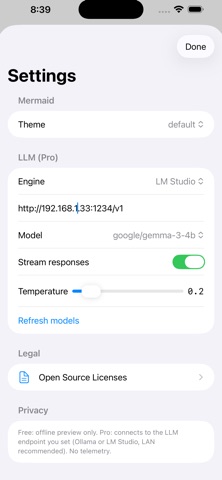
Local network connection: Connect to your Ollama server on your LAN (for example, http://192.168.1.x:11434).
Streaming responses: Follow generated source as it arrives in the editor.
Diagramming Features Included:
Mermaid + D2: Create and preview two diagram languages locally, from flowcharts and sequence diagrams to D2 architecture diagrams.
Projects and templates: Organize documents in projects and start from built-in Mermaid or D2 templates.
Live preview and export: Choose a theme and background, then export Mermaid (.mmd) or D2 (.d2) source, SVG, PNG, PDF, or GIF.
Optional Diagram Cloud sync: Sign in only if you want to sync diagrams to your Diagram Cloud account. Local copies remain available offline.

Why PrivyMermaid Pro?
Spend less time on diagram syntax and more time on the architecture. PrivyMermaid Pro keeps rendering offline and lets you choose when to use AI through your own local model.

Requirement: A running instance of Ollama on your local network/machine is required to utilize the AI features.
Category: Developer Tools(4119)
Version: 0.8.1
BundleId: com.kenelite.privymermaid.pro
Developer: GUOYU WANG
Updated: 2026-07-19
