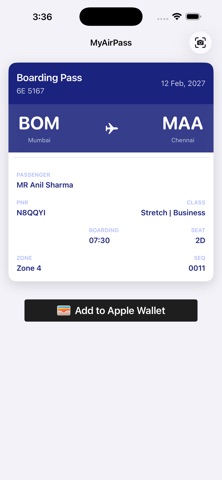
This is not an official Indigo Airlines app. This app lets you turn any Indigo Airlines boarding pass screenshot into an Apple Wallet pass in seconds.

MyAirPass uses on-device OCR to read your boarding pass photo and instantly creates a digital pass for Apple Wallet — complete with flight details, seat, gate, boarding time, and your original barcode.

HOW IT WORKS:
1. Take a photo or screenshot of your boarding pass
2. MyAirPass reads it instantly using on-device text recognition
3. Review the extracted details in a beautiful preview card
4. Tap "Add to Apple Wallet" — done!

You can also share a boarding pass image directly from Photos using the iOS Share menu.

KEY FEATURES:
- Instant OCR — extracts flight number, PNR, seat, gate, boarding time, departure, arrival, terminal, and more
- Original barcode preserved — your pass keeps the exact barcode from the boarding pass image, ready for scanning at the airport
- Works offline — all processing happens on your device, nothing is uploaded
- Apple Wallet integration — your pass appears alongside your other cards and passes
- Location-aware — your pass surfaces automatically when you arrive at the airport
- Share extension — send a boarding pass image from any app directly to MyAirPass

In the future we will add multiple airlines, trains, buses, etc to MyAirPass