Ever needed to quickly create a new file in a folder? Instead of opening an app, creating a file, and navigating back to save it — just right-click.

New File from Right Click adds the missing "New File" option to your file browser's context menu. One click, any file type, right where you need it.


SUPPORTED FILE TYPES

- Text (.txt)
- Markdown (.md)
- Rich Text (.rtf)
- HTML (.html)
- JavaScript (.js)
- Python (.py)
- Shell Script (.sh)
- JSON (.json)
- Any custom type you need


KEY FEATURES

Instant Creation
Right-click in any folder, choose your file type, done. No dialogs, no editors, no extra steps. Your new file appears exactly where you need it.

Custom File Types
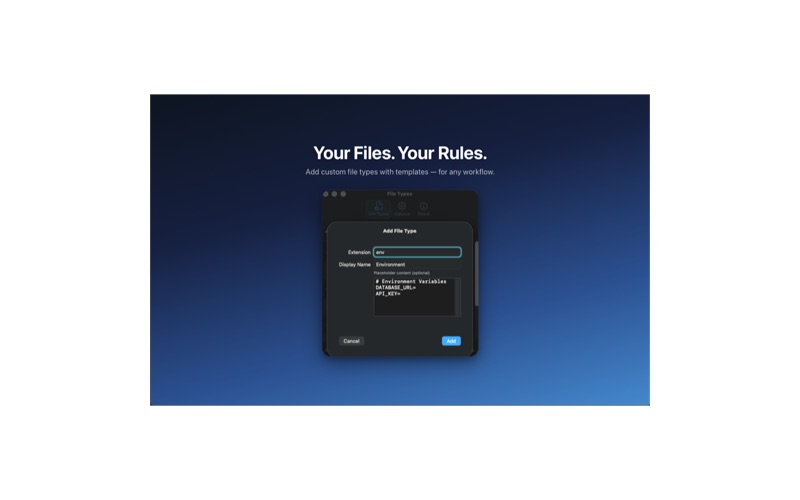
Add your own file types with custom extensions, display names, and placeholder content. Perfect for developers who need .tsx, .yml, .env, or any other file template.

Placeholder Content
Define starter content for your custom types. New HTML files with boilerplate, JSON with structure, Python with imports — ready to edit immediately.

Drag & Drop Ordering
Arrange file types in your preferred order. Your most-used types appear at the top of the context menu for even faster access.

Menu Bar Status
A lightweight menu bar icon shows the extension status at a glance. Quick access to settings without digging through system preferences.

Guided Setup
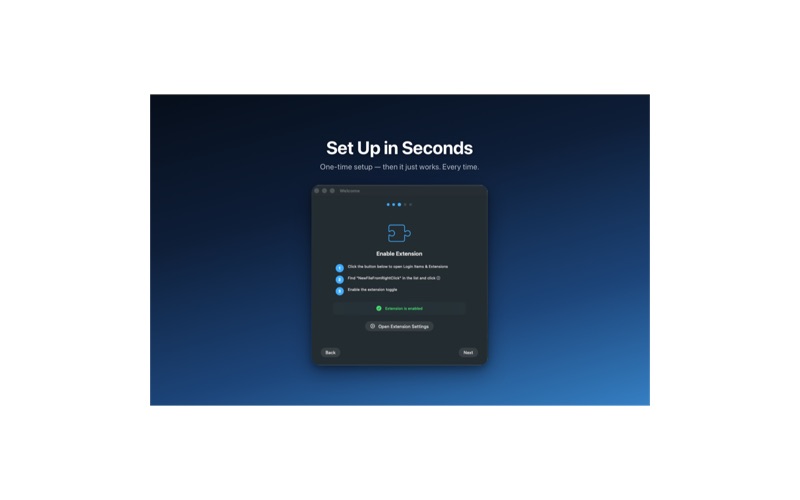
A beautiful onboarding walks you through enabling the extension and choosing your file types in under a minute.


BUILT FOR PRIVACY

- No data collection
- No analytics or tracking
- No network requests
- No accounts required
- Everything stays on your computer

Built natively with SwiftUI for blazing fast performance and a beautiful, familiar interface that feels right at home on your desktop.

---
Privacy Policy & Terms of Use:
https://merzkevin.de/privacy-newfilefromrightclick.html