See whats in your files without opening them.

LookQuick supercharges Quick Look on macOS with rich, beautiful previews for over 400 file types that macOS ignores out of the box . One press of the spacebar and you're looking at syntax-highlighted code, rendered markdown, browsable archives, and more — all without leaving Finder.

HIGHLIGHTS
• 20 syntax themes — Dracula, Monokai, Cyberpunk Neon, Nord, Synthwave, and more
• 3 Premium animated themes
• Full code previews with line numbers, word wrap, and custom fonts
• Rendered Markdown with adjustable font sizing
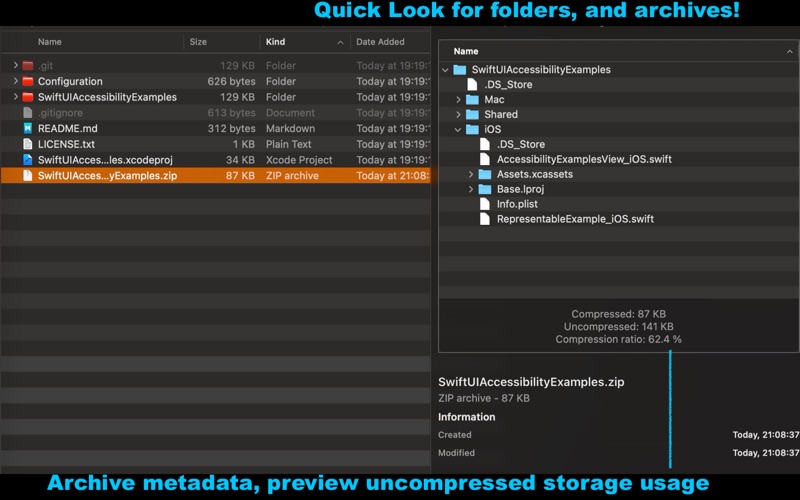
• Browsable directory previews with split-pane file inspection
• Collapsible Plist tree view — no more raw XML
• PDF previews with thumbnail sidebar and continuous scroll
• CSV / TSV tables with alternating rows and counts
• Archive inspection for ZIP, TAR, and GZ without extracting
• Jupyter Notebook rendering
• Xcode project structure at a glance

WORKS EVERYWHERE
Previews show up in Quick Look, Finder, and Spotlight — anywhere macOS renders previews.

FULLY CUSTOMIZABLE
Pick your theme, font family, font size, line numbers, word wrap, max file size, and more from the companion app. Preferences sync instantly to the extension.

SUPPORTED FILE TYPES
Source code — Swift, Python, JavaScript, TypeScript, Rust, Go, Ruby, Java, Kotlin, C/C++, C#, PHP, Lua, Haskell, and 50+ more
Documents — Markdown, LaTeX, Jupyter Notebook, PDF, CSV, TSV, Plist, JSON, YAML
Archives — ZIP, TAR, GZ, 7Z, RAR. XIP
Directories — folders, Xcode projects, Java JARs and other packages