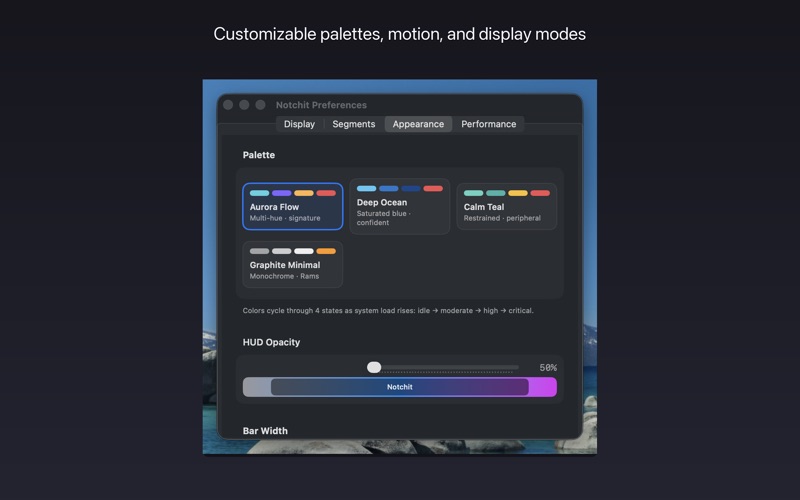
Notchit is a system-awareness HUD for macOS. On MacBooks with a notch, it docks a translucent bar one point below the hardware notch. On every other Mac, it runs as a menubar utility with the same detail panels one click away.

Six segments sit shoulder-to-shoulder — CPU, memory, network, disk, battery, and an aggregate activity indicator. Hover any segment and a Drop Detail panel slides down with live charts and breakdowns.

WHO IT'S FOR
• Developers watching builds and containers
• Creators keeping an eye on RAM and disk
• Remote workers checking which network they're on
• Anyone who wants to know what their Mac is doing without opening Activity Monitor

FEATURES
• Notch-aligned HUD for MBP 14/16 and MBA 13/15
• Menubar-only mode on Macs without a notch
• CPU with rolling average and spike markers
• RAM breakdown: used, active, wired, compressed, swap
• Network: live throughput, Wi-Fi/wired detection, local + public IPv4/IPv6, VPN detection, tap-to-copy
• Disk capacity per volume
• Battery state, condition, estimated time
• Display modes: Always-on, Hover, Click
• Per-segment visibility toggles
• Aurora Flow appearance palette
• Refresh: 1s / 2s / 5s
• Launch at Login via SMAppService

PRIVACY
No analytics, no advertising, no accounts, no telemetry. The only outbound request is to api.ipify.org — and only when you open the Network panel's Addresses section to view your own public IP. The response is shown and discarded.

REQUIREMENTS
• macOS 13 Ventura or later
• Apple silicon or Intel

A NOTE ON NON-NOTCH MACS
On iMac, Mac mini, Mac Studio, Mac Pro, and pre-notch MacBooks, no HUD is shown — the app runs as a menubar utility.