
Ghosted: Auto Lock & Pause
0.0 1.81MB 0 Free
Version 1.1.0
Updated 2026-06-12
Developer Calvin Thurman


Description
Ghosted is a macOS menu bar app that reacts when you step away from your Mac
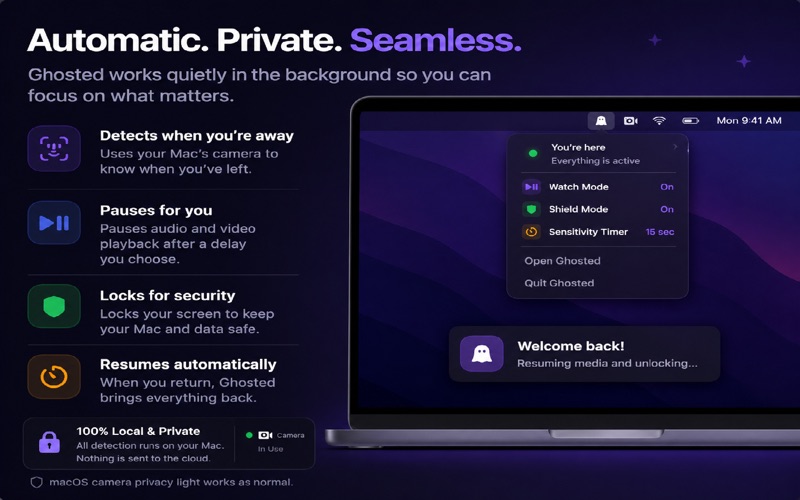
Ghosted is a macOS menu bar app that reacts when you step away from your Mac.

Turn on the modes you want, choose a delay, and Ghosted watches for presence using on-device camera detection. When you leave, it can pause media, lock your screen, capture a local screenshot, or send an HTTPS webhook depending on your settings.

Built for people who work around private information, shared spaces, client data, videos, music, calls, and open desks.

CORE FEATURES

- Watch Mode pauses media when you step away
- Shield Mode locks your screen after your chosen delay
- Menu bar control with a lightweight, focused interface
- Sensitivity presets plus a custom timer
- On-device camera presence detection
- No account required

PRO FEATURES

- Grace period to avoid triggering on brief glances away
- Per-app rules for different behavior in different apps
- Global keyboard shortcut to toggle detection quickly

PRO PLUS FEATURES

- Face recognition so only your enrolled face counts as present
- Screenshot on departure, saved locally on your Mac
- HTTPS webhook on departure for custom automations

PRIVACY

Ghosted is designed around local control. Camera frames are processed on your Mac for presence detection. Ghosted does not upload camera footage, does not require sign-in, and does not use behavioral tracking. Face enrollment data is stored locally in the macOS Keychain.

macOS will show the system camera indicator whenever camera-based detection is active. That indicator is controlled by macOS and cannot be hidden by apps.

USE GHOSTED TO

- Lock your Mac automatically when you walk away
- Pause videos or music without reaching for the keyboard
- Reduce exposed screens in offices, studios, dorms, and coffee shops
- Add presence-aware webhooks to your own workflows
- Keep privacy automation in the menu bar instead of adding another full app window

SUBSCRIPTIONS

Ghosted includes core features for free. Pro and Pro Plus subscriptions unlock advanced controls and automation features. Available plans may include a free trial where shown in the purchase screen. Subscriptions renew automatically unless cancelled in your App Store account settings.

REQUIREMENTS

Ghosted requires macOS 14 Sonoma or later and a Mac-compatible camera.

Support: https://blackstonerow.com/support
Privacy Policy: https://blackstonerow.com/privacy
Terms of Use: https://blackstonerow.com/terms
Category: Productivity(96543)
Version: 1.1.0
BundleId: com.blackstonerow.ghosted
Developer: Calvin Thurman
Updated: 2026-06-12
