SenseAir — Gesture Control for Your Mac
SenseAir lets you control your Mac with hand-drawn gestures
SenseAir — Gesture Control for Your Mac

SenseAir lets you control your Mac with hand-drawn gestures. Hold the Option key, draw a shape anywhere on your screen, and instantly trigger any action you've mapped to it — no menus, no shortcuts to memorize, no interruptions to your workflow.

How it works
Hold ⌥ Option (or your preferred modifier key) and left-click drag to draw a gesture. SenseAir recognizes the shape and fires the action you've assigned — in under a second, from anywhere on your screen.

What you can do with a gesture
• Launch any app on your Mac
• Open a file or folder instantly
• Open any URL in your browser
• Run any macOS Shortcut by name
• Paste a saved text snippet into whatever you're typing
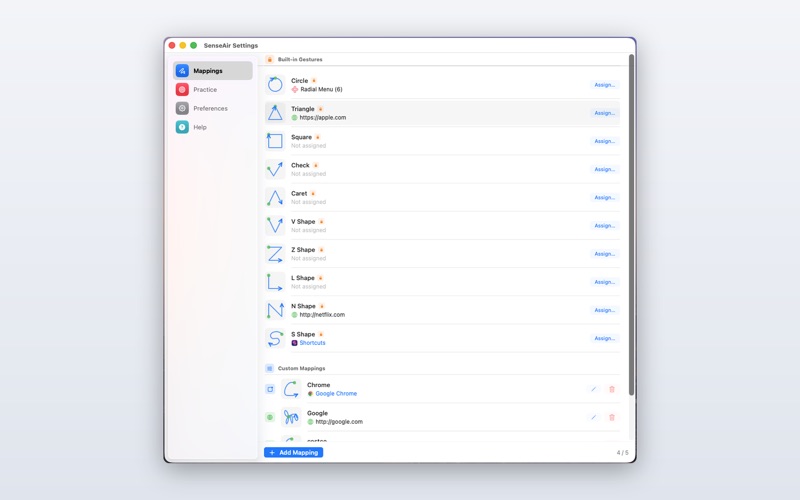
• Open a radial menu of up to 8 actions and flick toward the one you want

Designed to stay out of your way
SenseAir lives quietly in your menu bar with no Dock icon. It's always ready, never in the way. Pause recognition with one click whenever you need to.

Customise everything
Choose from 10 built-in gesture shapes — Circle, Triangle, Square, Check, V, Z, and more — or train your own. Assign any action, rename gestures, and edit them at any time. The more personal your gestures, the faster your workflow.

Pick a trigger modifier that fits how you work: ⌥ Option, ⌘ Command, or ⌃ Control. Fine-tune the recognition sensitivity so SenseAir matches your drawing style perfectly. Prefer a light or dark Settings window? Choose Light, Dark, or System to follow your Mac's theme.

Beautiful drawing effects
Watch your gesture come alive as you draw. Pick from three styles: a clean Colour Stroke (Blue, Red, Green, Pink), a glittering Sparkle particle trail (Gold, Pink, Blue, Green), or the new Jedi mode — a glowing lightsaber blade with a white-hot core and a subtle live flicker, in Blue, Green, Red, or Purple. Purely delightful, completely optional.

Privacy first
All gesture recognition happens 100% on your device — no internet connection required, no data ever leaves your Mac. SenseAir stores your gesture mappings and preferences locally using macOS UserDefaults. No analytics, no telemetry, no tracking of any kind.

Requirements: macOS 14.0 or later · Apple Silicon and Intel · Mac App Store