Paperforge is a fast, fully native Mac editor for notes, documents, Markdown, code, and PDFs in one focused tabbed window
Paperforge is a fast, fully native Mac editor for notes, documents, Markdown, code, and PDFs in one focused tabbed window. No Electron, no subscription, and no account required.

WRITE AND OPEN MORE
Work with Markdown, plain text, RTF, Word documents, source code, JSON, YAML, HTML, CSV, LaTeX, logs, and more. Paperforge selects the appropriate editing mode automatically. PDFs open beside your writing as convenient reference material.

BROWSE YOUR WORKSPACE
Open a folder to browse and search its documents from the sidebar. Quick Open, the command palette, table of contents, tabs, and keyboard navigation keep large projects easy to move through.

LIVE MARKDOWN PREVIEW
Switch between Editor, Split, and Preview. See tables, footnotes, task lists, syntax-highlighted code blocks, Mermaid diagrams, and math as you write. Choose from five preview themes, and paste images directly from the clipboard.

DOCUMENT DIAGNOSTICS
Catch broken local links, missing images, repeated headings, unfinished tasks, and other document issues before you publish. Live statistics keep word, character, line, and reading-time information close at hand.

PRINT AND EXPORT
Print from the toolbar or export polished, properly paginated PDFs and standalone HTML. Preview and export remain local and work without an internet connection.

ON-DEVICE AI WRITING
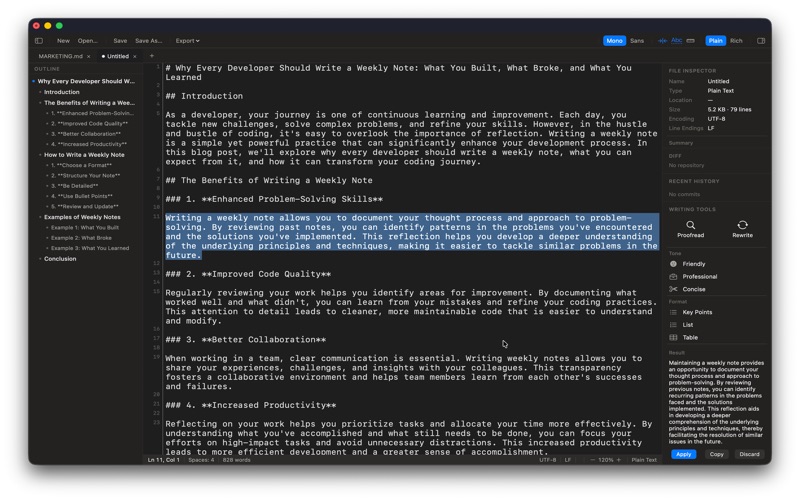
Describe what you need and generate a structured draft, then refine it with your own instructions. Proofread, rewrite, change tone, summarize, or extract key points from selected text using Apple Intelligence on device. Your document is not sent to a third-party AI service. Requires a compatible Mac with Apple Intelligence.

GIT WHEN YOU NEED IT
Review changes, stage files, commit, browse branches and history, create stashes, and inspect inline diffs without leaving the editor. Remote Git sync is optional and can be disabled in Settings; local writing and local Git tools continue to work offline.

TABS, RECOVERY, AND FOCUS
Work across multiple files, reopen your previous session, recover unsaved work after an unexpected quit, search faster, and use Zen Mode when you want a distraction-free canvas.

BUILT FOR macOS
Paperforge is written in Swift and SwiftUI with native AppKit editing views. It follows system appearance, supports familiar Mac shortcuts, and stays responsive with large documents.

SUPPORTED FORMATS
Markdown · Plain text · RTF · DOCX · DOC · Swift · Python · JavaScript · TypeScript · Shell · JSON · YAML · TOML · CSV · TSV · HTML · XML · SQL · LaTeX · Diff/Patch · Logs · Config files · PDF

One purchase. No subscription, locked features, or upsell.

Privacy Policy: https://3nsofts.com/products/paperforge/privacy
Terms of Use: https://3nsofts.com/products/paperforge/terms