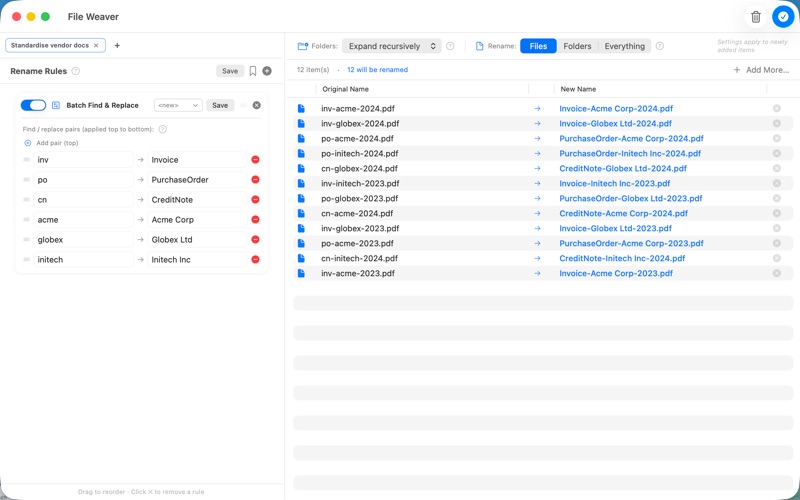
File Weaver is a fast, native batch renamer for macOS. Stack more than a dozen kinds of rename rule into a pipeline, watch every change update live, and rename a whole folder in one click — without a single file being touched until you say so.

Drop in a folder, build up your rules, and the before-and-after preview updates as you type. Happy with it? One click renames the lot. Extensions are preserved automatically, and nothing is written to disk until you confirm.

RULES, STACKED INTO A PIPELINE

Every rule takes the output of the one before it, so simple steps combine into powerful transformations. Reorder them by drag, toggle any rule on or off, and the preview keeps up instantly.

• Find & Replace — plain-text substitution, case-sensitive optional
• Batch Find & Replace — many find/replace pairs in a single rule
• Regex Replace — full regular expressions with capture groups ($1, $2, …)
• Add Prefix / Suffix — fixed text before or after the name
• Insert Text — drop text in at any position
• Sequential Number — start, step, padding and separator, before or after the name
• Change Case — UPPERCASE, lowercase, Title Case or Sentence case
• Trim Spaces — clean up stray and repeated spaces
• Strip Text — remove any list of unwanted words
• Restrict Characters — keep only the characters you allow (great for SharePoint-safe names)
• Map Extension — normalise extensions (.JPEG → .jpg) with wildcard matching
• Set Variable + Set Name — capture parts of a name and rebuild it from a template, even sorting files into subfolders
• Script — go further with a built-in scripting step and function reference

WORK IN TABS

Keep a separate rule set in each tab — Photos in one, Invoices in another, Scans in a third — and switch between jobs with a click. Save any tab as a reusable preset.

A SHARED LIBRARY OF PRESETS

Browse and install ready-made presets and rules from the built-in Library, sourced from public GitHub repositories. Install, update and uninstall in a click. Share your own: export any rule set as a .fwl file and send it on — a double-click imports it. Downloads only ever happen when you ask.

CONFIDENT BEFORE YOU COMMIT

The before-and-after table shows every change side by side. Nothing on disk moves until you press Rename — and then a confirmation asks one more time. Large batches show clear progress and can be cancelled.

SAFE BY DESIGN

File Weaver is fully sandboxed and signed for the Mac App Store. It only ever touches files you drag in or pick yourself, and never scans your disk in the background.

NO TRACKING. NO ACCOUNTS.

Your files never leave your Mac. No analytics, no logins, no ads, and no Sprocket Consulting servers. The only network access is optional and user-initiated: when you click Refresh or Download in the Library, File Weaver fetches preset files directly from GitHub — nothing about you or your files is ever sent.

PERFECT FOR

• Photographers cleaning up imports from a card
• Writers and editors normalising manuscript names
• Developers regularising asset names
• Teams making filenames safe for SharePoint and cross-platform shares
• Anyone who has ever screamed at a folder full of "IMG_4827.JPG"

Requires macOS 13 Ventura or later. Universal binary — native on Apple Silicon and Intel.

From Sprocket Consulting Ltd.