


Description
SpamRadar blocks spam texts and phishing attacks before they reach you — all on your device, in private
SpamRadar blocks spam texts and phishing attacks before they reach you — all on your device, in private.

Most spam filters send your messages to a cloud server to analyze them. SpamRadar never does. Every message is classified locally using an on-device AI model. No message content ever leaves your phone.

HOW IT WORKS
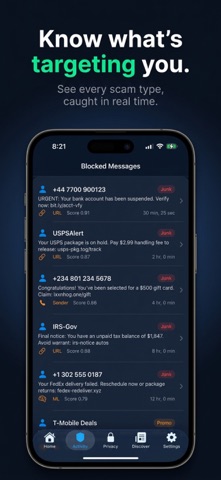
When an unknown sender texts you, iOS routes the message to SpamRadar's filter. It scores the message in milliseconds using machine learning, link analysis, and sender reputation — then routes it to your inbox, promotions, or junk. Your messages stay on your device the entire time.

WHAT IT CATCHES
• Phishing links (fake bank, IRS, USPS, delivery scams)
• Prize and lottery texts
• Urgent account suspension threats
• Suspicious international senders
• URL shorteners hiding malicious destinations
• Government impersonation texts

WHAT YOU SEE
The dashboard tracks every threat caught. See how many messages were blocked, flagged as promotions, or passed through. No message content is ever stored — only counts and categories.

PRIVACY BY DESIGN
Apple's message filter sandbox physically prevents network access during filtering. SpamRadar is built entirely within that sandbox. There is no server, no account, and no way for message content to leave your device.

SETUP TAKES 30 SECONDS
1. Open Settings → Apps → Messages
2. Toggle on Screen Unknown Senders
3. Tap Text Message Filter → select SpamRadar

SpamRadar is free. No subscription, no paywall.
Category: Utilities(185746)
Version: 1.0
BundleId: wheez.spamradar
Developer: Twin Suns LLC
Updated: 2026-05-21
