Turn any text, screenshot, flyer, or photo into a calendar event in seconds. Add to Calendar reads the details with AI — title, date, time, and location — and hands you a ready-to-save event. Stop typing event info by hand.

HOW IT WORKS
• Paste or type text — "Lunch with Sam Friday 12:30 at Blue Bottle"
• Or pick a screenshot / snap a photo of a flyer, invite, ticket, or email
• AI pulls out the event details
• Tap once to save it to your Apple Calendar, or open it in Google Calendar

PERFECT FOR
• Screenshots of concert, class, or appointment details
• Event flyers and posters
• Email and message invites
• Conference and meeting agendas
• Tickets and booking confirmations

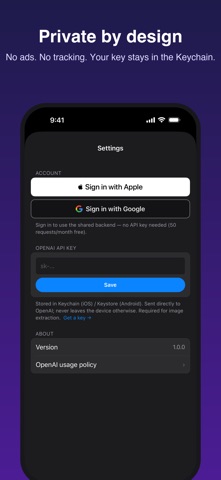
PRIVATE BY DESIGN
• Sign in with Apple or Google — or skip the account entirely and use your own OpenAI API key
• Your API key is stored only in the iOS Keychain and never leaves your device except to reach OpenAI
• No ads, no third-party tracking, no selling your data
• Delete your account right inside the app

PRICING
• Free: sign in and extract events from text — 50 per month
• Bring your own OpenAI key for unlimited extractions and image (screenshot/photo) scanning

Add to Calendar is the fastest way to get what's in front of you onto your calendar.