


Description
TourGrid Guardian is the mobile app for parents and guardians whose children are traveling on organized tours with operators who use the TourGrid platform
TourGrid Guardian is the mobile app for parents and guardians whose children are traveling on organized tours with operators who use the TourGrid platform. Stay informed about where your family member is, what is planned next, and when they leave or enter designated safe zones—all from your iPhone or iPad.

BUILT FOR FAMILIES ON TOUR
• My Family — See every dependent linked to your guardian account, with active tour groups, dates, and status at a glance.
• Tour overview — View group name, package name, and start and end dates for each trip your child is on.
• Simple navigation — Open location or schedule for any active tour with one tap.

LIVE LOCATION MAP
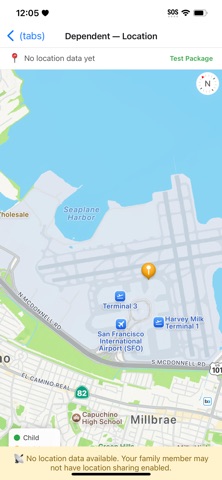
• Real-time tracking — See your dependent’s latest location on an interactive map when they have location sharing enabled in the TourGrid Tourist app.
• Last seen — Know when location was last updated so you can judge how fresh the data is.
• Activity points — View scheduled stops and points of interest from the tour itinerary on the map.
• Safe zones — See geofence circles set by your tour operator for the group.
• Map legend and Fit All — Quickly understand markers for child, activities, and safe zones, and zoom to show everything on screen.

TOUR SCHEDULE
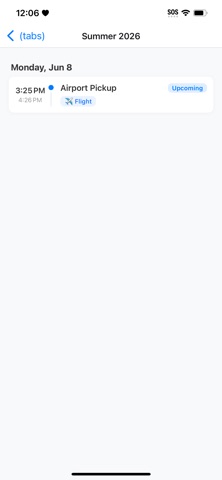
• Daily itinerary — Browse your child’s schedule grouped by day with times, activity types (flights, hotels, meals, transport, activities, and more), and locations.
• Status at a glance — See whether each item is upcoming, active, completed, or passed.

GEOFENCE ALERTS
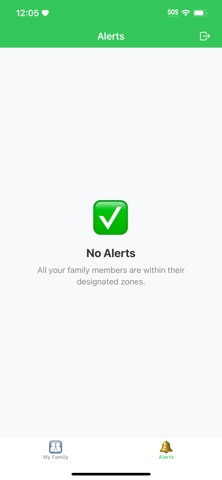
• Alerts inbox — Review when a family member enters or leaves a designated zone, with zone name, tour group, and timestamp.
• Peace of mind — Get notified when movement matters, without needing to watch the map constantly.

WORKS WITH TOURGRID
TourGrid Guardian connects to the same ecosystem as TourGrid’s Agency Portal, Guide app, and Tourist app. Your tour operator assigns tourists to groups and links your guardian account to your child. Tourists share location from the Tourist app when they choose to enable it. Guides and operators manage tours from their own TourGrid tools—your Guardian app stays in sync.

GETTING STARTED
1. Create a guardian account in TourGrid Guardian, or sign in if you already have one.
2. Ask your tour operator to link you as a guardian for your child’s tourist profile.
3. When a tour is active, open My Family, then tap Location or Schedule for that group.

IMPORTANT
Location and alerts depend on your tour operator’s settings and your family member’s participation (including location sharing on the Tourist app). TourGrid Guardian does not replace emergency services—contact local authorities in an emergency.

Questions or need help? Contact your tour operator or your organization’s support page.

TourGrid Guardian — clarity and confidence while your family explores the world.
Category: Travel(57928)
Version: 1.0
BundleId: com.bespokescript.tourgrid.guardian
Developer: Ygor Lopez de Rezende
Updated: 2026-06-10
